- Changing time signature or key signature mid-stave
- First and second repeats
- Displaying quadruplets in compound time accurately
Showing posts with label Elm. Show all posts
Showing posts with label Elm. Show all posts
Sunday, October 2, 2016
Interactive Music Score Engraving
This is a short post about a JavaScript library I've recently discovered for producing music scores called VexFlow. It includes a language for defining score layouts called VexTab. Although this is still under development, it is complete enough to give me about 95% of what I need for displaying scores of simple traditional melodies. The main features that are missing at the moment are:

Friday, June 3, 2016
Using Modules in Elm 0.17
Elm 0.17 introduces significant breaking changes from the previous release. FRP has gone, as have signals, but what has improved is a more coherent architecture using the key new concept of subscriptions to external services. These are managed for you by the elm runtime and will return Cmd messages to you in exactly the same way as (for example) a view component will return a message. The overall architecture is nicely summarised in this picture.
There is no doubt that this is a major improvement, but unfortunately elm is still severely lacking in one crucial area - integration with the web platform API. Evan has indicated how it is likely that this might be achieved in the future with a small set of examples which include web sockets and which rely on a still undocumented feature named Effect Managers.
The unfortunate result of this is that, if you want (say) to use a platform API such as web-audio, you are still encouraged to do so using ports, which provide a subscription to javascript services. These have major drawbacks - you are not allowed to build a library if you use them and are thus debarred from publishing it as a community package. Nor can you build a simple single artefact for distribution by other means - the javascript produced by your module must be hand-assembled alongside that produced by the calling program.
So, a good many developers will be forced down the road of using ports to access the platform API and producing their own modules as 'pseudo-libraries' for getting the job done.

This is all as expected. The only subtlety is that the module exposes the SetRecording message type that allows the calling program to tell it which recording to play. The messages that respond to the player buttons are hidden and act autonomously.
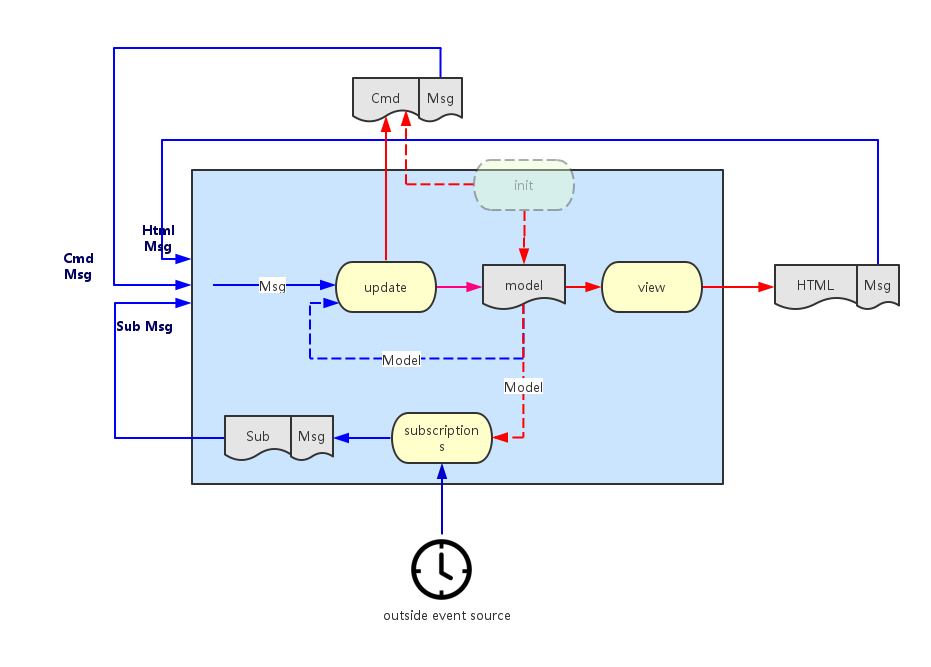
There is no doubt that this is a major improvement, but unfortunately elm is still severely lacking in one crucial area - integration with the web platform API. Evan has indicated how it is likely that this might be achieved in the future with a small set of examples which include web sockets and which rely on a still undocumented feature named Effect Managers.
The unfortunate result of this is that, if you want (say) to use a platform API such as web-audio, you are still encouraged to do so using ports, which provide a subscription to javascript services. These have major drawbacks - you are not allowed to build a library if you use them and are thus debarred from publishing it as a community package. Nor can you build a simple single artefact for distribution by other means - the javascript produced by your module must be hand-assembled alongside that produced by the calling program.
So, a good many developers will be forced down the road of using ports to access the platform API and producing their own modules as 'pseudo-libraries' for getting the job done.
Modules
Whereas there is good documentation for showing you how to build modules there is less available on the subject of how to incorporate a module into your program, particularly if it uses ports. The rest of this article gives an explanation of how this might be done.
Suppose your module encapsulates a widget that plays back midi recordings on a suitable instrument. It might look like this, with a start/pause and stop button and a capsule which shows the proportion of the tune that has been played:

The module will use web-audio to actually create the sounds and so will use ports to a javascript service. It will export a module definition looking like this:
module Midi.Player exposing (Model, Msg (SetRecording), init, update, view, subscriptions)
This is all as expected. The only subtlety is that the module exposes the SetRecording message type that allows the calling program to tell it which recording to play. The messages that respond to the player buttons are hidden and act autonomously.
Main Program
The following section describes how the calling program that (somehow) gets hold of a MIDI recording via the MIDI message might integrate the player:import
import Midi.Player exposing (Model, Msg, init, update, view, subscriptions)
model
   type alias Model =
     {
       myStuff :....
     , recording : Result String MidiRecording
     , player : Midi.Player.Model
     }
messages
The program needs to send a message to the player which describes the midi recording to play. Otherwise, all player messages must simply be delegated to the player itself:
    type Msg
      = MyMessage MyStuff
      | Midi (Result String MidiRecording )
      | PlayerMsg Midi.Player.Msg
initialisation
It is important that the calling program allows the player to be initialised. The let expression gets hold of the player initialisation command and then the Cmd map function turns the module-level message into a program-level message. The exclamation mark function requires some explanation - it is used here as a shorthand to convert the model into the (model, Cmd Msg) tuple.
    init : (Model, Cmd Msg)
    init =
      let
        myStuff = ....
          (player, playerCmd) = Midi.Player.init recording
      in
        {
          myStuff = myStuff
        , recording = Err "not started"
        , player = player
        } ! [Cmd.map PlayerMsg playerCmd]
update
It is assumed that the program issues a message somehow to get hold of a MIDI recording which it then saves to the model with an incoming Midi message once it receives the response. Thereafter, all module-level messages are simply delegated to the module:
    update : Msg -> Model -> (Model, Cmd Msg)
    update msg model =
      case msg of

        MyMessage stuff -> ...

        Midi result ->
          ( { model | recording = result }, establishRecording result )

        PlayerMsg playerMsg ->
          let
            (newPlayer, cmd) = Midi.Player.update playerMsg model.player
          in
            { model | player = newPlayer } ! [Cmd.map PlayerMsg cmd]
where establishRecording sends a command to the player which establishes the recording to play:
    establishRecording : Result String MidiRecording -> Cmd Msg
    establishRecording r =
      Task.perform (\_ -> NoOp)
                   (\_ -> PlayerMsg (Midi.Player.SetRecording r))
                   (Task.succeed (\_ -> ()))
view
To see the player widget, you have to map the message onto the player view:
    view : Model -> Html Msg
    view model =
      div []
        [
        myView ..
        ,  Html.map PlayerMsg (Midi.Player.view model.player)
        ]
subscriptions
Similarly, you must map the subscriptions onto those of the MIDI player (alongside any subscriptions the program requires for other purposes):
    subscriptions : Model -> Sub Msg
    subscriptions model =
      Sub.batch
        [  mySubs ...
        ,  Sub.map PlayerMsg (Midi.Player.subscriptions model.player)
        ]
Final Integration
The complete source of the MIDI player module can be found here. An example of a final html file that integrates the javascript from the player module with that of a calling program named MidiFilePlayer can be found here.Friday, March 11, 2016
Is elm a game-changer?
I'm a server-side developer. Whenever I venture into the web side of things, I'm faintly horrified at what I find - three disparate languages, ad hoc structure, events firing from different widgets often with no clear overall effect and so on. For me, the most frightening is javascript - I am sure there is a very competent functional language in there struggling to get out, but it's difficult to find.
Elm solves these problems. Html, css and javascript are simply encapsulated as pure functions, and all you need do is combine them together in straightforward ways and you get no surprises. All messages are routed sequentially through one single place, so that you simply pattern match on the signal stream and you thus retain control of your application's behaviour. Elm code compiles down to a safe subset of javascript in such a manner that you virtually never see any kind of runtime exception. Also you get a very simple interactive development environment with truly informative compiler error messages.
This means that I can now approach the web tier in the same way that I approach the server tier - for the first time I'm feeling comfortable. I suppose this is elm's main value proposition - you can control both your application's look-and-feel and its behaviour and it's all in the context of a simple mental model.
But I want to approach things from left-field. I'm less interested in how the application looks than in how it sounds. Audio has been the poor relation in web programming for such a long time now, and elm is no exception. However, once Evan comes clean about his plans for wrapping the web platform API, I fully expect audio to blossom in elm. What I find exciting is that it's now possible to build, quite quickly, relatively sophisticated tools and have them run in the browser in a manner that I would previously have thought to be impossible.
I've now written two fairly substantial parsers - one for MIDI and the other for the ABC notation (which describes musical scores). Both use the wonderful elm-combine parser combinator library from Bogdan Popa. This has proven itself to be a great choice - not just because you can write practical parsers with it but also because of the great support Bogdan provides.
If you come from a javascript background, you're perhaps not too sure of what a functional parser is. A traditional imperative parser is monolithic - it will usually employ a lexer for building tokens from the individual characters and a single parser for checking that the token stream fits the grammar and for building a parse tree. By contrast, a functional parser is built from lots of very tiny parsers, combined together. For example, you may have one that just parses a particular character sequence such as the word 'import' or another that just parses integers and so on.
It turns out that you can combine these little parsers together very simply. Just to give one example, the ABC notation has a concept of a tuplet which is a generalisation of a triplet (three notes taking the time allotted to two) or a quadruplet (four notes taking the time allotted to three) and so on. For example, a triplet for three successive notes on a keyboard from middle C would be notated as (3CDE.
You might want to represent it in a parse tree like this to imply that a tuplet consists of a signature part (e.g. 3 or 4) and a list of notes (e.g. A,B and C):
To deconstruct this statement - there are three primitive parsers - for the left bracket character, the tuplet signature (i.e. 3 or 4) and for a note in ABC notation (i.e. A, B or C). The abcNote parser is used with the many1 combinator which means that one or more instances of a note are recognised, producing a list. The *> and <*> operators mean that you process the parser at their left followed by the one on their right in sequence. The difference being that the first of these throws the left hand result away whilst retaining the right hand side result, whilst the second retains both results. So at this stage, we've successfully parsed (say) a triplet and retained the '3' and the 'ABC'. Finally, the <$> combinator just applies the Tuple constructor function we defined earlier to the two results, building the Music type. (All types are, however wrapped inside a Parser type). This is an example of what is called the applicative style.
The full parser for ABC is merely extends this technique to cover the entire grammar.
Elm solves these problems. Html, css and javascript are simply encapsulated as pure functions, and all you need do is combine them together in straightforward ways and you get no surprises. All messages are routed sequentially through one single place, so that you simply pattern match on the signal stream and you thus retain control of your application's behaviour. Elm code compiles down to a safe subset of javascript in such a manner that you virtually never see any kind of runtime exception. Also you get a very simple interactive development environment with truly informative compiler error messages.
This means that I can now approach the web tier in the same way that I approach the server tier - for the first time I'm feeling comfortable. I suppose this is elm's main value proposition - you can control both your application's look-and-feel and its behaviour and it's all in the context of a simple mental model.
But I want to approach things from left-field. I'm less interested in how the application looks than in how it sounds. Audio has been the poor relation in web programming for such a long time now, and elm is no exception. However, once Evan comes clean about his plans for wrapping the web platform API, I fully expect audio to blossom in elm. What I find exciting is that it's now possible to build, quite quickly, relatively sophisticated tools and have them run in the browser in a manner that I would previously have thought to be impossible.
Functional Parsers
I've now written two fairly substantial parsers - one for MIDI and the other for the ABC notation (which describes musical scores). Both use the wonderful elm-combine parser combinator library from Bogdan Popa. This has proven itself to be a great choice - not just because you can write practical parsers with it but also because of the great support Bogdan provides.
If you come from a javascript background, you're perhaps not too sure of what a functional parser is. A traditional imperative parser is monolithic - it will usually employ a lexer for building tokens from the individual characters and a single parser for checking that the token stream fits the grammar and for building a parse tree. By contrast, a functional parser is built from lots of very tiny parsers, combined together. For example, you may have one that just parses a particular character sequence such as the word 'import' or another that just parses integers and so on.
It turns out that you can combine these little parsers together very simply. Just to give one example, the ABC notation has a concept of a tuplet which is a generalisation of a triplet (three notes taking the time allotted to two) or a quadruplet (four notes taking the time allotted to three) and so on. For example, a triplet for three successive notes on a keyboard from middle C would be notated as (3CDE.
You might want to represent it in a parse tree like this to imply that a tuplet consists of a signature part (e.g. 3 or 4) and a list of notes (e.g. A,B and C):
   type Music =
      Tuplet TupletSignature (List AbcNote)
    | ....
another way of looking at this is that Tuplet is a constructor function that builds a Music type and which has the signature:
Tuplet : TupletSignature -> (List AbcNote) -> Music
Now, a parser for this part of the ABC language might look like this:
    tuplet : Parser Music
    tuplet = Tuplet <$> (char '(' *> tupletSignature) <*> many1 abcNote
I'm well aware that this looks like hieroglyphics and that elm discourages the use of infix operators like these but in the case of functional parsers, I think their use is entirely justified and, once you get used to them, makes life considerably simpler.To deconstruct this statement - there are three primitive parsers - for the left bracket character, the tuplet signature (i.e. 3 or 4) and for a note in ABC notation (i.e. A, B or C). The abcNote parser is used with the many1 combinator which means that one or more instances of a note are recognised, producing a list. The *> and <*> operators mean that you process the parser at their left followed by the one on their right in sequence. The difference being that the first of these throws the left hand result away whilst retaining the right hand side result, whilst the second retains both results. So at this stage, we've successfully parsed (say) a triplet and retained the '3' and the 'ABC'. Finally, the <$> combinator just applies the Tuple constructor function we defined earlier to the two results, building the Music type. (All types are, however wrapped inside a Parser type). This is an example of what is called the applicative style.
The full parser for ABC is merely extends this technique to cover the entire grammar.
Web-Audio Players
Once you have a parse tree, it is then a relatively simple job to translate it into a set of instructions for playing each individual note (at the correct pitch and for the intended duration). This can then be dispatched to web-audio so that the tune can be played. Web-audio is supported in recent versions of most 'modern' browsers like Chrome, Firefox and Opera. Unfortunately, elm 0.16 has no simple way of integrating with javascript APIs like these and so you have to resort to the frowned-upon technique of wrapping a javascript integration layer inside an elm interface. The hints coming from elm-dev suggest that this might be solved in 0.17.
The net result of all this? You can accept an ABC tune from a user, parse it, and if it is valid, play it immediately. All this takes place in the browser. All the applications that I know about that do this sort of thing do the processing on the server before returning something playable to the client. So, my contention is that elm allows you to attempt applications in the browser that simply were not possible before (or at least not without superhuman effort).
If all this has given you a thirst for learning the ABC notation, there's an interactive tutorial here and an ABC editor here. The code is here.
If all this has given you a thirst for learning the ABC notation, there's an interactive tutorial here and an ABC editor here. The code is here.
Tuesday, October 6, 2015
Elm and Web-MIDI
This post is about attempting to learn two new technologies and one old one. The two new ones are Web-MIDI (which allows you to plug MIDI devices into your computer and do things with music in the browser) and the Elm programming language (which promises at last to bring some coherence to the challenge of writing web applications using the witches brew which is HTML, CSS and JavaScript). The old one is in fact JavaScript itself - I've always avoided it like the plague but now I feel there is a reason for getting to grips with it.
In other respects, Elm Syntax is very like Haskell, but with occasional borrowings from F# for its composition operators. What is lacking, though, is Typeclasses. This means, for example, that you can't just use map to operate on lists - you have to preface is as List.map because Elm can't distinguish it from others such as Signal.map.
and, of course, we need a view of this state. Elm's HTML primitives help to keep this terse:
Update for Elm 0.17
Now that Elm 0.17 has been released, the description of elm in this post no longer applies. Signals have been removed, the rules are starting to change for writing native modules. From today (May 14th), I have deprecated elm-webmidi.
Web-MIDI
Considering how long MIDI has been in existence, you would think that handling it in browsers would be second-nature by now, but sadly this is not the case. Working draft 17 of the Web MIDI API was only published in March of this year, and at the time of writing, only Chrome has an implementation. It is not a large document. The most important features are illustrated by these two functions:
    function midiConnect () {
      // request MIDI access and then connect
      if (navigator.requestMIDIAccess) {
         navigator.requestMIDIAccess().then(onMIDISuccess)
      }
    }

    // Set up all the signals we expect if MIDI is supported
    function onMIDISuccess(midiAccess) {
        var inputs = midiAccess.inputs.values();

        // loop over any register inputs and listen for data on each
        midiAccess.inputs.forEach( function( input, id, inputMap ) {
          registerInput(input);
          input.onmidimessage = onMIDIMessage;
        });

        // listen for connect/disconnect message
        midiAccess.onstatechange = onStateChange;
    }
The requestMIDIAccess function detects whether MIDI is supported in the browser and then hands control to an asynchronous function onMIDISuccess if it finds there is support. This allows you to discover all the MIDI input devices that are connected, to register them and also register a callback which will respond to MIDI messages provided by that device (for example key presses on a keyboard). You can handle MIDI output devices the same way, but I will not cover that here. Finally you can register another callback that listens to connection or disconnection messages as devices are unplugged or plugged back in to your computer.
Elm 0.16
Elm is a Functional Reactive Programming language. It replaces the traditional callbacks used by JavaScript with the concept of a Signal. Such a signal might be, for instance, a succession of mouse clicks or keyboard presses - in other words it represents a stream of input values over the passage of time. What Elm forces you to do is to merge all the signals that you encounter in your program and then it routes this composite signal to one central place. Here, a single function, foldp, operates which has the following signature:
This is a bit like a traditional fold, except it operates over time. It takes three parameters - (1) a function that knows how to update global state from an incoming value, (2) the current state and (3) an incoming signal - and then it composes all these together so that you get a signal for the overall state. Whereas the traditional JavaScript model would have you deal with a set of individual callbacks which would operate on the global state of your program in often incomprehensible ways (because it is so difficult to reason about when you're in the middle of callback hell), the Elm model simply requires you to hold global state and refresh it completely each time any signal comes in. That this approach doesn't slow reactivity down to a crawl is due to one thing - Virtual DOM. An abstract version of DOM is built rather than writing it directly, and this comes with clever diffing algorithms so that when you want to view your state as HTML, only a small amount of rewriting needs to occur.foldp : (a -> s -> s) -> s -> Signal a -> Signal s
In other respects, Elm Syntax is very like Haskell, but with occasional borrowings from F# for its composition operators. What is lacking, though, is Typeclasses. This means, for example, that you can't just use map to operate on lists - you have to preface is as List.map because Elm can't distinguish it from others such as Signal.map.
Elm-WebMidi
To build a MIDI library for Elm, you have to write 'Native' JavaScript code which takes each of the callbacks described earlier and turns them into Elm signals. I'll say a little more about how this is done later on, but for now, assume that there are three separate signals with the following type signatures:
The data types MidiConnect, MidiDisconnect and MidiNote are simply tuples that gather together the appropriate attributes from the Web-MIDI interface. MidiConnect signals are emitted by the onStateChange callback for a new connection, but they are also emitted when the web application starts up if there happen to be any devices already attached. The library allows us to write an application which lists the various devices such as MIDI keyboards as they appear and disappear and which also displays each key as it is pressed alongside its parent device.-- a connection signal Signal MidiConnect -- a disconnection signal Signal MidiDisconnect -- a note signal Signal MidiNote
Anatomy of an Elm Application
This sort of application is perhaps slightly simpler than other sample applications that you see on the Elm examples page because there is no direct user interaction with any widgets in the HTML view - all interaction is via the MIDI device. It uses a standard MVC pattern. The first step is to gather together each of the three input signals. A MidiMessage algebraic data type is used to represent this disjunction, each Signal is mapped to this common type and then the Signals are joined together with Elm's mergeMany function.
We then need a model to represent the global state that we wish to keep. This is merely a list of input devices, and associated with each one is an optional MIDI note:
   type MidiMessage = MC MidiConnect | MN MidiNote | MD MidiDisconnect

   -- Merged signals
   notes : Signal MidiMessage
   notes = Signal.map MN midiNoteS

   inputs : Signal MidiMessage
   inputs = Signal.map MC midiInputS

   disconnects : Signal MidiMessage
   disconnects = Signal.map MD midiDisconnectS

   midiMessages : Signal MidiMessage
   midiMessages = mergeMany [inputs, notes, disconnects]
   -- Model
   type alias MidiInputState =
     { midiInput: MidiConnect
     , noteM: Maybe MidiNote
     }

   type alias MidiState = List MidiInputState
and, of course, we need a view of this state. Elm's HTML primitives help to keep this terse:
   -- VIEW
   viewNote : MidiNote -> String
   viewNote mn = "noteOn:" ++ (toString mn.noteOn) ++ ",pitch:" ++
                 (toString mn.pitch) ++ ",velocity:" ++ (toString mn.velocity)

   viewPortAndNote : MidiInputState -> Html
   viewPortAndNote mis =
     case mis.noteM of
       Nothing ->
          li [] [ text mis.midiInput.name]
       Just min ->
          li [] [ text ( mis.midiInput.name ++ ": " ++ (viewNote min)) ]

   view : MidiState -> Html
   view ms =
     div []
       [ let inputs = List.map viewPortAndNote ms
         in ul [] inputs
       ]
The main program applies the foldp function to produce each new state, and displays it with the view function. The initial state is just the empty list:
   -- Main
   midiState : Signal MidiState
   midiState = Signal.foldp stepMidi initialState midiMessages

   main : Signal Html
   main = Signal.map view midiState
All that's left to describe is the stepMidi function that recomputes the global state as each signal arrives. It deconstructs the signal into its original components using pattern-matching:
   stepMidi : MidiMessage -> MidiState -> MidiState
   stepMidi mm ms =
      case mm of
        -- an incoming MIDI input connection - add it to the list
        MC midiConnect ->
           { midiInput = midiConnect, noteM = Nothing } :: ms
        -- an incoming note - find the appropriate MIDI input id, add the note to it
        MN midiNote ->
           let updateInputState inputState =
             if midiNote.sourceId == inputState.midiInput.id
               then
                 { inputState | noteM <- Just midiNote }
            else
              inputState
        in
           List.map updateInputState ms
        -- a disconnect of an existing input - remove it from the list
        MD midiDisconnect ->
           List.filter (\is -> is.midiInput.id /= midiDisconnect.id) ms
Writing a Native Elm Module
There seems, as yet, to be very little documentation about how to go about this. The best approach is probably to look through the core Elm libraries on Github and adopt the conventions that these exemplify. You will need to make use of the common Runtime JavaScript that Elm will pass you and which allows access to the core features - for example List and Signal. In the Elm-WebMidi library, I made use of two main features. Firstly, Elm tuples are simply JavaScript objects with a discriminator labelled 'ctor' with the value (say) '_Tuple5' for a 5-member tuple. Secondly, signals can be built simply by using Elm.Native.Signal.make. The JavaScript then returns an object containing these three signals. Alongside the JavaScript, you need an Elm file that redefines this interface in Elm terms, but uses the JavaScript implementation. If you are interested, the Elm-WebMidi library and sample program can be found here.
Subscribe to:
Posts (Atom)