- Changing time signature or key signature mid-stave
- First and second repeats
- Displaying quadruplets in compound time accurately
Sunday, October 2, 2016
Interactive Music Score Engraving
This is a short post about a JavaScript library I've recently discovered for producing music scores called VexFlow. It includes a language for defining score layouts called VexTab. Although this is still under development, it is complete enough to give me about 95% of what I need for displaying scores of simple traditional melodies. The main features that are missing at the moment are:

Friday, June 3, 2016
Using Modules in Elm 0.17
Elm 0.17 introduces significant breaking changes from the previous release. FRP has gone, as have signals, but what has improved is a more coherent architecture using the key new concept of subscriptions to external services. These are managed for you by the elm runtime and will return Cmd messages to you in exactly the same way as (for example) a view component will return a message. The overall architecture is nicely summarised in this picture.
There is no doubt that this is a major improvement, but unfortunately elm is still severely lacking in one crucial area - integration with the web platform API. Evan has indicated how it is likely that this might be achieved in the future with a small set of examples which include web sockets and which rely on a still undocumented feature named Effect Managers.
The unfortunate result of this is that, if you want (say) to use a platform API such as web-audio, you are still encouraged to do so using ports, which provide a subscription to javascript services. These have major drawbacks - you are not allowed to build a library if you use them and are thus debarred from publishing it as a community package. Nor can you build a simple single artefact for distribution by other means - the javascript produced by your module must be hand-assembled alongside that produced by the calling program.
So, a good many developers will be forced down the road of using ports to access the platform API and producing their own modules as 'pseudo-libraries' for getting the job done.

This is all as expected. The only subtlety is that the module exposes the SetRecording message type that allows the calling program to tell it which recording to play. The messages that respond to the player buttons are hidden and act autonomously.
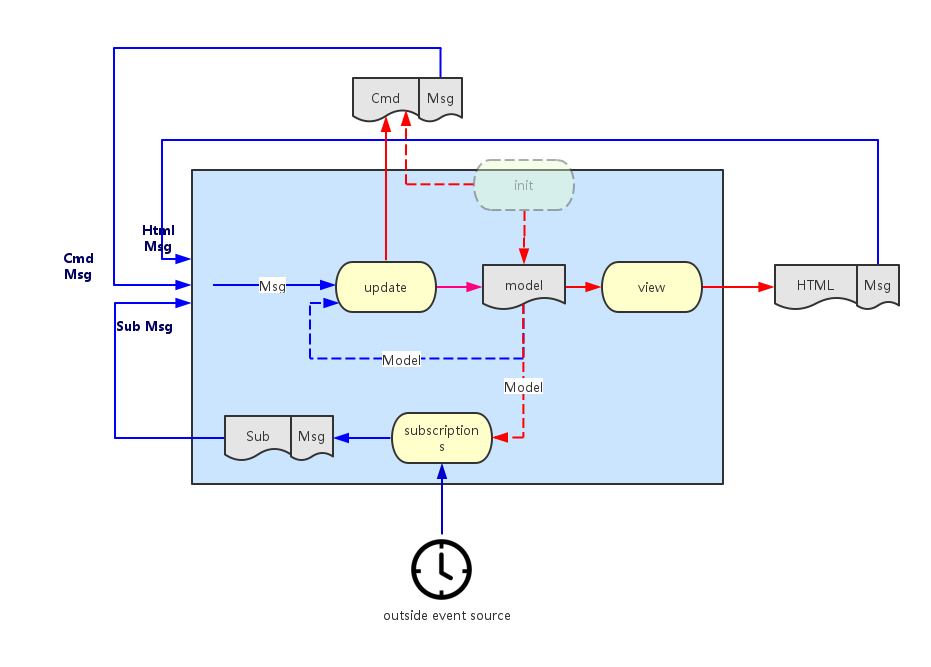
There is no doubt that this is a major improvement, but unfortunately elm is still severely lacking in one crucial area - integration with the web platform API. Evan has indicated how it is likely that this might be achieved in the future with a small set of examples which include web sockets and which rely on a still undocumented feature named Effect Managers.
The unfortunate result of this is that, if you want (say) to use a platform API such as web-audio, you are still encouraged to do so using ports, which provide a subscription to javascript services. These have major drawbacks - you are not allowed to build a library if you use them and are thus debarred from publishing it as a community package. Nor can you build a simple single artefact for distribution by other means - the javascript produced by your module must be hand-assembled alongside that produced by the calling program.
So, a good many developers will be forced down the road of using ports to access the platform API and producing their own modules as 'pseudo-libraries' for getting the job done.
Modules
Whereas there is good documentation for showing you how to build modules there is less available on the subject of how to incorporate a module into your program, particularly if it uses ports. The rest of this article gives an explanation of how this might be done.
Suppose your module encapsulates a widget that plays back midi recordings on a suitable instrument. It might look like this, with a start/pause and stop button and a capsule which shows the proportion of the tune that has been played:

The module will use web-audio to actually create the sounds and so will use ports to a javascript service. It will export a module definition looking like this:
module Midi.Player exposing (Model, Msg (SetRecording), init, update, view, subscriptions)
This is all as expected. The only subtlety is that the module exposes the SetRecording message type that allows the calling program to tell it which recording to play. The messages that respond to the player buttons are hidden and act autonomously.
Main Program
The following section describes how the calling program that (somehow) gets hold of a MIDI recording via the MIDI message might integrate the player:import
import Midi.Player exposing (Model, Msg, init, update, view, subscriptions)
model
   type alias Model =
     {
       myStuff :....
     , recording : Result String MidiRecording
     , player : Midi.Player.Model
     }
messages
The program needs to send a message to the player which describes the midi recording to play. Otherwise, all player messages must simply be delegated to the player itself:
    type Msg
      = MyMessage MyStuff
      | Midi (Result String MidiRecording )
      | PlayerMsg Midi.Player.Msg
initialisation
It is important that the calling program allows the player to be initialised. The let expression gets hold of the player initialisation command and then the Cmd map function turns the module-level message into a program-level message. The exclamation mark function requires some explanation - it is used here as a shorthand to convert the model into the (model, Cmd Msg) tuple.
    init : (Model, Cmd Msg)
    init =
      let
        myStuff = ....
          (player, playerCmd) = Midi.Player.init recording
      in
        {
          myStuff = myStuff
        , recording = Err "not started"
        , player = player
        } ! [Cmd.map PlayerMsg playerCmd]
update
It is assumed that the program issues a message somehow to get hold of a MIDI recording which it then saves to the model with an incoming Midi message once it receives the response. Thereafter, all module-level messages are simply delegated to the module:
    update : Msg -> Model -> (Model, Cmd Msg)
    update msg model =
      case msg of

        MyMessage stuff -> ...

        Midi result ->
          ( { model | recording = result }, establishRecording result )

        PlayerMsg playerMsg ->
          let
            (newPlayer, cmd) = Midi.Player.update playerMsg model.player
          in
            { model | player = newPlayer } ! [Cmd.map PlayerMsg cmd]
where establishRecording sends a command to the player which establishes the recording to play:
    establishRecording : Result String MidiRecording -> Cmd Msg
    establishRecording r =
      Task.perform (\_ -> NoOp)
                   (\_ -> PlayerMsg (Midi.Player.SetRecording r))
                   (Task.succeed (\_ -> ()))
view
To see the player widget, you have to map the message onto the player view:
    view : Model -> Html Msg
    view model =
      div []
        [
        myView ..
        ,  Html.map PlayerMsg (Midi.Player.view model.player)
        ]
subscriptions
Similarly, you must map the subscriptions onto those of the MIDI player (alongside any subscriptions the program requires for other purposes):
    subscriptions : Model -> Sub Msg
    subscriptions model =
      Sub.batch
        [  mySubs ...
        ,  Sub.map PlayerMsg (Midi.Player.subscriptions model.player)
        ]
Final Integration
The complete source of the MIDI player module can be found here. An example of a final html file that integrates the javascript from the player module with that of a calling program named MidiFilePlayer can be found here.Friday, March 11, 2016
Is elm a game-changer?
I'm a server-side developer. Whenever I venture into the web side of things, I'm faintly horrified at what I find - three disparate languages, ad hoc structure, events firing from different widgets often with no clear overall effect and so on. For me, the most frightening is javascript - I am sure there is a very competent functional language in there struggling to get out, but it's difficult to find.
Elm solves these problems. Html, css and javascript are simply encapsulated as pure functions, and all you need do is combine them together in straightforward ways and you get no surprises. All messages are routed sequentially through one single place, so that you simply pattern match on the signal stream and you thus retain control of your application's behaviour. Elm code compiles down to a safe subset of javascript in such a manner that you virtually never see any kind of runtime exception. Also you get a very simple interactive development environment with truly informative compiler error messages.
This means that I can now approach the web tier in the same way that I approach the server tier - for the first time I'm feeling comfortable. I suppose this is elm's main value proposition - you can control both your application's look-and-feel and its behaviour and it's all in the context of a simple mental model.
But I want to approach things from left-field. I'm less interested in how the application looks than in how it sounds. Audio has been the poor relation in web programming for such a long time now, and elm is no exception. However, once Evan comes clean about his plans for wrapping the web platform API, I fully expect audio to blossom in elm. What I find exciting is that it's now possible to build, quite quickly, relatively sophisticated tools and have them run in the browser in a manner that I would previously have thought to be impossible.
I've now written two fairly substantial parsers - one for MIDI and the other for the ABC notation (which describes musical scores). Both use the wonderful elm-combine parser combinator library from Bogdan Popa. This has proven itself to be a great choice - not just because you can write practical parsers with it but also because of the great support Bogdan provides.
If you come from a javascript background, you're perhaps not too sure of what a functional parser is. A traditional imperative parser is monolithic - it will usually employ a lexer for building tokens from the individual characters and a single parser for checking that the token stream fits the grammar and for building a parse tree. By contrast, a functional parser is built from lots of very tiny parsers, combined together. For example, you may have one that just parses a particular character sequence such as the word 'import' or another that just parses integers and so on.
It turns out that you can combine these little parsers together very simply. Just to give one example, the ABC notation has a concept of a tuplet which is a generalisation of a triplet (three notes taking the time allotted to two) or a quadruplet (four notes taking the time allotted to three) and so on. For example, a triplet for three successive notes on a keyboard from middle C would be notated as (3CDE.
You might want to represent it in a parse tree like this to imply that a tuplet consists of a signature part (e.g. 3 or 4) and a list of notes (e.g. A,B and C):
To deconstruct this statement - there are three primitive parsers - for the left bracket character, the tuplet signature (i.e. 3 or 4) and for a note in ABC notation (i.e. A, B or C). The abcNote parser is used with the many1 combinator which means that one or more instances of a note are recognised, producing a list. The *> and <*> operators mean that you process the parser at their left followed by the one on their right in sequence. The difference being that the first of these throws the left hand result away whilst retaining the right hand side result, whilst the second retains both results. So at this stage, we've successfully parsed (say) a triplet and retained the '3' and the 'ABC'. Finally, the <$> combinator just applies the Tuple constructor function we defined earlier to the two results, building the Music type. (All types are, however wrapped inside a Parser type). This is an example of what is called the applicative style.
The full parser for ABC is merely extends this technique to cover the entire grammar.
Elm solves these problems. Html, css and javascript are simply encapsulated as pure functions, and all you need do is combine them together in straightforward ways and you get no surprises. All messages are routed sequentially through one single place, so that you simply pattern match on the signal stream and you thus retain control of your application's behaviour. Elm code compiles down to a safe subset of javascript in such a manner that you virtually never see any kind of runtime exception. Also you get a very simple interactive development environment with truly informative compiler error messages.
This means that I can now approach the web tier in the same way that I approach the server tier - for the first time I'm feeling comfortable. I suppose this is elm's main value proposition - you can control both your application's look-and-feel and its behaviour and it's all in the context of a simple mental model.
But I want to approach things from left-field. I'm less interested in how the application looks than in how it sounds. Audio has been the poor relation in web programming for such a long time now, and elm is no exception. However, once Evan comes clean about his plans for wrapping the web platform API, I fully expect audio to blossom in elm. What I find exciting is that it's now possible to build, quite quickly, relatively sophisticated tools and have them run in the browser in a manner that I would previously have thought to be impossible.
Functional Parsers
I've now written two fairly substantial parsers - one for MIDI and the other for the ABC notation (which describes musical scores). Both use the wonderful elm-combine parser combinator library from Bogdan Popa. This has proven itself to be a great choice - not just because you can write practical parsers with it but also because of the great support Bogdan provides.
If you come from a javascript background, you're perhaps not too sure of what a functional parser is. A traditional imperative parser is monolithic - it will usually employ a lexer for building tokens from the individual characters and a single parser for checking that the token stream fits the grammar and for building a parse tree. By contrast, a functional parser is built from lots of very tiny parsers, combined together. For example, you may have one that just parses a particular character sequence such as the word 'import' or another that just parses integers and so on.
It turns out that you can combine these little parsers together very simply. Just to give one example, the ABC notation has a concept of a tuplet which is a generalisation of a triplet (three notes taking the time allotted to two) or a quadruplet (four notes taking the time allotted to three) and so on. For example, a triplet for three successive notes on a keyboard from middle C would be notated as (3CDE.
You might want to represent it in a parse tree like this to imply that a tuplet consists of a signature part (e.g. 3 or 4) and a list of notes (e.g. A,B and C):
   type Music =
      Tuplet TupletSignature (List AbcNote)
    | ....
another way of looking at this is that Tuplet is a constructor function that builds a Music type and which has the signature:
Tuplet : TupletSignature -> (List AbcNote) -> Music
Now, a parser for this part of the ABC language might look like this:
    tuplet : Parser Music
    tuplet = Tuplet <$> (char '(' *> tupletSignature) <*> many1 abcNote
I'm well aware that this looks like hieroglyphics and that elm discourages the use of infix operators like these but in the case of functional parsers, I think their use is entirely justified and, once you get used to them, makes life considerably simpler.To deconstruct this statement - there are three primitive parsers - for the left bracket character, the tuplet signature (i.e. 3 or 4) and for a note in ABC notation (i.e. A, B or C). The abcNote parser is used with the many1 combinator which means that one or more instances of a note are recognised, producing a list. The *> and <*> operators mean that you process the parser at their left followed by the one on their right in sequence. The difference being that the first of these throws the left hand result away whilst retaining the right hand side result, whilst the second retains both results. So at this stage, we've successfully parsed (say) a triplet and retained the '3' and the 'ABC'. Finally, the <$> combinator just applies the Tuple constructor function we defined earlier to the two results, building the Music type. (All types are, however wrapped inside a Parser type). This is an example of what is called the applicative style.
The full parser for ABC is merely extends this technique to cover the entire grammar.
Web-Audio Players
Once you have a parse tree, it is then a relatively simple job to translate it into a set of instructions for playing each individual note (at the correct pitch and for the intended duration). This can then be dispatched to web-audio so that the tune can be played. Web-audio is supported in recent versions of most 'modern' browsers like Chrome, Firefox and Opera. Unfortunately, elm 0.16 has no simple way of integrating with javascript APIs like these and so you have to resort to the frowned-upon technique of wrapping a javascript integration layer inside an elm interface. The hints coming from elm-dev suggest that this might be solved in 0.17.
The net result of all this? You can accept an ABC tune from a user, parse it, and if it is valid, play it immediately. All this takes place in the browser. All the applications that I know about that do this sort of thing do the processing on the server before returning something playable to the client. So, my contention is that elm allows you to attempt applications in the browser that simply were not possible before (or at least not without superhuman effort).
If all this has given you a thirst for learning the ABC notation, there's an interactive tutorial here and an ABC editor here. The code is here.
If all this has given you a thirst for learning the ABC notation, there's an interactive tutorial here and an ABC editor here. The code is here.
Tuesday, October 6, 2015
Elm and Web-MIDI
This post is about attempting to learn two new technologies and one old one. The two new ones are Web-MIDI (which allows you to plug MIDI devices into your computer and do things with music in the browser) and the Elm programming language (which promises at last to bring some coherence to the challenge of writing web applications using the witches brew which is HTML, CSS and JavaScript). The old one is in fact JavaScript itself - I've always avoided it like the plague but now I feel there is a reason for getting to grips with it.
In other respects, Elm Syntax is very like Haskell, but with occasional borrowings from F# for its composition operators. What is lacking, though, is Typeclasses. This means, for example, that you can't just use map to operate on lists - you have to preface is as List.map because Elm can't distinguish it from others such as Signal.map.
and, of course, we need a view of this state. Elm's HTML primitives help to keep this terse:
Update for Elm 0.17
Now that Elm 0.17 has been released, the description of elm in this post no longer applies. Signals have been removed, the rules are starting to change for writing native modules. From today (May 14th), I have deprecated elm-webmidi.
Web-MIDI
Considering how long MIDI has been in existence, you would think that handling it in browsers would be second-nature by now, but sadly this is not the case. Working draft 17 of the Web MIDI API was only published in March of this year, and at the time of writing, only Chrome has an implementation. It is not a large document. The most important features are illustrated by these two functions:
    function midiConnect () {
      // request MIDI access and then connect
      if (navigator.requestMIDIAccess) {
         navigator.requestMIDIAccess().then(onMIDISuccess)
      }
    }

    // Set up all the signals we expect if MIDI is supported
    function onMIDISuccess(midiAccess) {
        var inputs = midiAccess.inputs.values();

        // loop over any register inputs and listen for data on each
        midiAccess.inputs.forEach( function( input, id, inputMap ) {
          registerInput(input);
          input.onmidimessage = onMIDIMessage;
        });

        // listen for connect/disconnect message
        midiAccess.onstatechange = onStateChange;
    }
The requestMIDIAccess function detects whether MIDI is supported in the browser and then hands control to an asynchronous function onMIDISuccess if it finds there is support. This allows you to discover all the MIDI input devices that are connected, to register them and also register a callback which will respond to MIDI messages provided by that device (for example key presses on a keyboard). You can handle MIDI output devices the same way, but I will not cover that here. Finally you can register another callback that listens to connection or disconnection messages as devices are unplugged or plugged back in to your computer.
Elm 0.16
Elm is a Functional Reactive Programming language. It replaces the traditional callbacks used by JavaScript with the concept of a Signal. Such a signal might be, for instance, a succession of mouse clicks or keyboard presses - in other words it represents a stream of input values over the passage of time. What Elm forces you to do is to merge all the signals that you encounter in your program and then it routes this composite signal to one central place. Here, a single function, foldp, operates which has the following signature:
This is a bit like a traditional fold, except it operates over time. It takes three parameters - (1) a function that knows how to update global state from an incoming value, (2) the current state and (3) an incoming signal - and then it composes all these together so that you get a signal for the overall state. Whereas the traditional JavaScript model would have you deal with a set of individual callbacks which would operate on the global state of your program in often incomprehensible ways (because it is so difficult to reason about when you're in the middle of callback hell), the Elm model simply requires you to hold global state and refresh it completely each time any signal comes in. That this approach doesn't slow reactivity down to a crawl is due to one thing - Virtual DOM. An abstract version of DOM is built rather than writing it directly, and this comes with clever diffing algorithms so that when you want to view your state as HTML, only a small amount of rewriting needs to occur.foldp : (a -> s -> s) -> s -> Signal a -> Signal s
In other respects, Elm Syntax is very like Haskell, but with occasional borrowings from F# for its composition operators. What is lacking, though, is Typeclasses. This means, for example, that you can't just use map to operate on lists - you have to preface is as List.map because Elm can't distinguish it from others such as Signal.map.
Elm-WebMidi
To build a MIDI library for Elm, you have to write 'Native' JavaScript code which takes each of the callbacks described earlier and turns them into Elm signals. I'll say a little more about how this is done later on, but for now, assume that there are three separate signals with the following type signatures:
The data types MidiConnect, MidiDisconnect and MidiNote are simply tuples that gather together the appropriate attributes from the Web-MIDI interface. MidiConnect signals are emitted by the onStateChange callback for a new connection, but they are also emitted when the web application starts up if there happen to be any devices already attached. The library allows us to write an application which lists the various devices such as MIDI keyboards as they appear and disappear and which also displays each key as it is pressed alongside its parent device.-- a connection signal Signal MidiConnect -- a disconnection signal Signal MidiDisconnect -- a note signal Signal MidiNote
Anatomy of an Elm Application
This sort of application is perhaps slightly simpler than other sample applications that you see on the Elm examples page because there is no direct user interaction with any widgets in the HTML view - all interaction is via the MIDI device. It uses a standard MVC pattern. The first step is to gather together each of the three input signals. A MidiMessage algebraic data type is used to represent this disjunction, each Signal is mapped to this common type and then the Signals are joined together with Elm's mergeMany function.
We then need a model to represent the global state that we wish to keep. This is merely a list of input devices, and associated with each one is an optional MIDI note:
   type MidiMessage = MC MidiConnect | MN MidiNote | MD MidiDisconnect

   -- Merged signals
   notes : Signal MidiMessage
   notes = Signal.map MN midiNoteS

   inputs : Signal MidiMessage
   inputs = Signal.map MC midiInputS

   disconnects : Signal MidiMessage
   disconnects = Signal.map MD midiDisconnectS

   midiMessages : Signal MidiMessage
   midiMessages = mergeMany [inputs, notes, disconnects]
   -- Model
   type alias MidiInputState =
     { midiInput: MidiConnect
     , noteM: Maybe MidiNote
     }

   type alias MidiState = List MidiInputState
and, of course, we need a view of this state. Elm's HTML primitives help to keep this terse:
   -- VIEW
   viewNote : MidiNote -> String
   viewNote mn = "noteOn:" ++ (toString mn.noteOn) ++ ",pitch:" ++
                 (toString mn.pitch) ++ ",velocity:" ++ (toString mn.velocity)

   viewPortAndNote : MidiInputState -> Html
   viewPortAndNote mis =
     case mis.noteM of
       Nothing ->
          li [] [ text mis.midiInput.name]
       Just min ->
          li [] [ text ( mis.midiInput.name ++ ": " ++ (viewNote min)) ]

   view : MidiState -> Html
   view ms =
     div []
       [ let inputs = List.map viewPortAndNote ms
         in ul [] inputs
       ]
The main program applies the foldp function to produce each new state, and displays it with the view function. The initial state is just the empty list:
   -- Main
   midiState : Signal MidiState
   midiState = Signal.foldp stepMidi initialState midiMessages

   main : Signal Html
   main = Signal.map view midiState
All that's left to describe is the stepMidi function that recomputes the global state as each signal arrives. It deconstructs the signal into its original components using pattern-matching:
   stepMidi : MidiMessage -> MidiState -> MidiState
   stepMidi mm ms =
      case mm of
        -- an incoming MIDI input connection - add it to the list
        MC midiConnect ->
           { midiInput = midiConnect, noteM = Nothing } :: ms
        -- an incoming note - find the appropriate MIDI input id, add the note to it
        MN midiNote ->
           let updateInputState inputState =
             if midiNote.sourceId == inputState.midiInput.id
               then
                 { inputState | noteM <- Just midiNote }
            else
              inputState
        in
           List.map updateInputState ms
        -- a disconnect of an existing input - remove it from the list
        MD midiDisconnect ->
           List.filter (\is -> is.midiInput.id /= midiDisconnect.id) ms
Writing a Native Elm Module
There seems, as yet, to be very little documentation about how to go about this. The best approach is probably to look through the core Elm libraries on Github and adopt the conventions that these exemplify. You will need to make use of the common Runtime JavaScript that Elm will pass you and which allows access to the core features - for example List and Signal. In the Elm-WebMidi library, I made use of two main features. Firstly, Elm tuples are simply JavaScript objects with a discriminator labelled 'ctor' with the value (say) '_Tuple5' for a 5-member tuple. Secondly, signals can be built simply by using Elm.Native.Signal.make. The JavaScript then returns an object containing these three signals. Alongside the JavaScript, you need an Elm file that redefines this interface in Elm terms, but uses the JavaScript implementation. If you are interested, the Elm-WebMidi library and sample program can be found here.Saturday, April 18, 2015
Reverse Engineering MIDI
I am very keen to expand the number of Scandi tunes that are saved to my tradtunedb site but I am finding that not enough people are posting tunes - largely because they are put off by the seeming complexity of the abc notation. One of my friends told me they'd find it a lot simpler if they could just play the tune on a MIDI keyboard and somehow get this automatically converted to abc. This got me thinking...
What is particularly useful is that Euterpea comes with functions to convert between MIDI and this Music data type. This is a good deal more attractive to work with - all you really get from MIDI is an instruction to turn a note on in a particular manner and then later to turn it off again. Euterpea manages the conversion by prefacing each note in the tune with a rest whose length is identical to the offset of the note in the tune and then composing all these two-item phrases in parallel. It thus becomes relatively easy, when trying to produce scores, to identify the notes that start each bar, although no bar indications are present in the Music data type itself.
As yet, Euterpea provides no help at all for producing a score of any kind from Music. It has a notion of a function that would provide notation called NotateFun but this is unimplemented.
Accordingly, I don't want to be too ambitious in trying to recreate an abc score. I will limit myself to monophonic MIDI files and to relatively straightforward Scandi tunes with just a single melody line. On the whole, these tend to be in standard rhythms but the most prevalent is the polska. These are normally written in 3/4 time but are not waltzes - they have an emphasis on the first and third beats of the bar. They come in various forms: the slängpolska is straightforward, dividing each beat into semiquavers: the triplet polska, as its name suggests, tends to divide each beat into triplets.
 You would think that 9/8 would be a better representation (as in Irish slip jigs) but by convention, 3/4 is normally used. This means that if you offer the choice of time signature, you have more work to do in the translation of these polskas into 3/4 because you have to invoke the special abc triplet notation which is used whenever three notes take the time allotted to two. This must also be done for another very common polska form - the so-called short first beat polska where three notes are played as a regular triplet lasting the first full two beats in the bar.

You also need to pay attention to the way accidentals are represented in the score. Once an accidental is marked in any particular bar, you no longer need to mark further instances of the note explicitly that occur later in the bar, because they inherit their pitch markers from the previous instance.
The Haskell School of Music
And then, by chance, I stumbled upon the Haskell School of Music (HSoM). This is a very comprehensive Haskell tutorial, chock-full of exercises, but where all the examples are taken from the field of music. It's the brainchild of Paul Hudak who is both one of the original designers of Haskell and also a keen musician. The book is a successor to his previous Haskell School of Expression, but to my mind it is a great improvement, partly because the treatment of the language is both clearer and deeper and partly because the exercises benefit from the common theme. Although HSoM is still very much a work in progress, it is remarkably comprehensive. It is split into two principal sections - the first part develops a domain-specific language for representing pieces of music and the second explores the generation, composition and analysis of musical signals which would allow you, for example, to design your own electronic instrument. All this is achieved by gradually introducing Euterpea, a computer music library developed in Haskell which supports the programming of computer music at both at the note level and the signal level.Euterpea
Euterpea stems from a previous library also developed by Paul called Haskore and is maintained on github. It has at its core the Music algebraic data type:
data Music a  =
       Prim (Primitive a)               --  primitive value
    |  Music a :+: Music a              --  sequential composition
    |  Music a :=: Music a              --  parallel composition
    |  Modify Control (Music a)         --  modifier
  deriving (Show, Eq, Ord)
where Control is represented like this:
data Control =
          Tempo       Rational           --  scale the tempo
       |  Transpose   AbsPitch           --  transposition
       |  Instrument  InstrumentName     --  instrument label
       |  Phrase      [PhraseAttribute]  --  phrase attributes
       |  Player      PlayerName         --  player label
       |  KeySig      PitchClass Mode    --  key signature and mode
  deriving (Show, Eq, Ord)
The Control type allows you to insert a variety of modifying instructions - usually at the phrase level (for example you can transpose a tune, pick an instrument or indicate dynamic markings) but otherwise Music is extremely straightforward. Primitives represent the notes (or rests) themselves and you can compose phrases together either serially or in parallel. This is simple but powerful - for example if you compose individual notes in parallel, you get a chord, if you compose whole phrases of notes in parallel you can define different melodic lines, perhaps played on different MIDI instruments.
What is particularly useful is that Euterpea comes with functions to convert between MIDI and this Music data type. This is a good deal more attractive to work with - all you really get from MIDI is an instruction to turn a note on in a particular manner and then later to turn it off again. Euterpea manages the conversion by prefacing each note in the tune with a rest whose length is identical to the offset of the note in the tune and then composing all these two-item phrases in parallel. It thus becomes relatively easy, when trying to produce scores, to identify the notes that start each bar, although no bar indications are present in the Music data type itself.
As yet, Euterpea provides no help at all for producing a score of any kind from Music. It has a notion of a function that would provide notation called NotateFun but this is unimplemented.
Producing Scores
When you want to produce a performance of some kind from Music, things are relatively straightforward. Music is expressive enough to combine different notes together in any manner you wish and Control allows you to plug in your own modifiers, letting you express your own interpretation of the performance. But when you want to go in the opposite direction, things get trickier because the translation into MIDI is lossy - you lose nearly all the contextual information originally applied to phrases.Accordingly, I don't want to be too ambitious in trying to recreate an abc score. I will limit myself to monophonic MIDI files and to relatively straightforward Scandi tunes with just a single melody line. On the whole, these tend to be in standard rhythms but the most prevalent is the polska. These are normally written in 3/4 time but are not waltzes - they have an emphasis on the first and third beats of the bar. They come in various forms: the slängpolska is straightforward, dividing each beat into semiquavers:


Representing Scores
Scores will be represented in an algebraic data type Score:
data Score a = EndScore
             | Bar Int (Notes a) (Score a)
        deriving (Show, Eq, Ord)

data Notes a = PrimNote a
             | (Notes a) :+++: (Notes a)    -- a group of notes
             | Phrase (Tuplet a)            -- a duplet, triplet or quadruplet
        deriving (Show, Eq, Ord)

-- here Rational defines the type of Tuplet -
-- (2/3) is two notes in the time of three (duplet)
-- (3/2) is three notes in the time of two (triplet)
-- (4/3) is four notes in the time of three (quadruplet)
data Tuplet a = Tuplet Rational [a]
        deriving (Show, Eq, Ord)
As with Euterpea, it is polymorphic in the type of note being represented, allowing you to start with Euterpea's representation and end with one more suited to abc. Although very simple, it is sufficient to represent the set of notes in an abc score given the restrictions mentioned above - so for example I have dispensed with the parallel constructor because I am only interested in single line melodies. Other properties of the score such as time signature or key signature are carried by abc as headers and so are represented separately - simply as configuration properties.
Imposing Structure
Transformation from MIDI to abc is now a matter of attempting to apply more and more structure to the set of raw notes that you start with. Here are some of the key elements:Note Duration
Euterpea uses fractional durations but abc uses integral durations. It's sensible to unify on a smallest duration of 1/96th note. This is convenient because it is small enough not to lose precision but has both 3 and 4 as factors and so can be used to represent notes in triplets and quadruplets. A bar of 4/4 music will occupy 96 such measures and we can deduce the length of the smallest note we can reliably detect (for example a 1/32 note occupies 3 measures) which we can call the shortest detectable note.Bar Lines
MIDI has a notion of time signature and from this and the rounded note durations and offsets we can work out where the bar lines are intended and thus invoke the Bar constructor. If a note spreads across such a bar line, we have to split it into two notes linked with a tie, itself notated as a note type. We can then label all the bars in the score monotonically from zero. This also gives us a mechanism for issuing end of line markers to spread the score out evenly if we issue them regularly after a certain count of bars. We can also work out where the beats in the music occur and mark each note as either on or off the beat. This helps us to separate note phrases in the abc.Long Notes
When we unify a note's duration, we may find it has a length (say) of (5/8) or (7/8). This is impossible to notate as a single entity and so we again split into two notes which we now can notate, joined by a tie.Tuplets
If a note does not consist of an exact number of shortest detectable note durations, it is a candidate for embedding in a tuplet. This is true for quadruplets (having a note duration of 3/32) and triplets (having a note duration of 1/12). In addition, duplet notes have a duration of 3/16. We then continue to add neighbouring notes to the tuplet until the total duration is equal to that of an even number of beats.Pitches
MIDI is specific about pitches - F# is always F#. However, its display in a score depends on the key signature. In the key of C Major it would be shown as F# but in the key of G Major it would be shown simply as F, inheriting its 'sharpness' from the key signature. Conversely, an F natural note in this key is required to be explicitly marked as a natural. To handle this translation it seems sensible to generate a chromatic scale of notes for each possible key and then to translate simply by lookup into this list. MIDI also has a notion of octave which can be directly translated into an abc octave marker.You also need to pay attention to the way accidentals are represented in the score. Once an accidental is marked in any particular bar, you no longer need to mark further instances of the note explicitly that occur later in the bar, because they inherit their pitch markers from the previous instance.
Articulation
MIDI has no concept of rests, which only exist as gaps between successive notes. This means we need a heuristic which will somehow discriminate between cases where a note decays earlier than intended and where a legitimate rest is indeed intended. Our approach is to identify all such gaps, and where the duration is longer than the shortest detectable note, to insert a rest, otherwise to extend the preceding note by the gap's duration.Code
The first phase of the project uses MIDI files that themselves were computer-generated (in fact from abc) and so are very regular in rhythm. If you are at all interested, the code is here. A web interface to the midi translation is here.Sunday, October 19, 2014
Downloading Resources from Cross-Origin Requests
If you decide to have a separate web- and backend- tier, cross-origin HTTP requests cause no end of difficulties in a variety of unlikely ways. I've written before about using CORS headers to mitigate some of them but here's yet another. It surfaces whenever you try to use the download attribute in an anchor tag but where the URI resource lives on the backend and not the web server. For example, I host tunes on my server and I want users to be able to download the tune scores which are in pdf format:
download pdfThe intention is that when the user selects the link, the browser will know that the resource is intended to be downloaded and will use the download attribute value as the file name. This indeed happens when the resource is hosted locally, but it no longer does so in the most recent versions of Chrome when it's hosted remotely. It seems as if the Chrome developers have now implemented a rather awkward algorithm in the html5 spec designed to mitigate possible security dangers in downloading files from untrusted sites. This is ostensibly because a hostile server could try to inveigle a user into unwittingly downloading private information (thinking it came from the hostile server itself) which could then perhaps be re-uploaded to that server. The solution is to use the Content-Disposition HTTP header when serving up the resource to suggest a file name. For example:
Content-Disposition: attachment; filename=mytune.pdfConforming browsers should then use this name when they interpret the download attribute in the anchor tag.
Friday, August 29, 2014
Functional Programming in Scala
Richard Feynman said what I cannot create I do not understand, notoriously misquoted by Craig Venter as what I cannot build I do not understand when he inserted it as a watermark into the DNA of his bacterium with an artificial genome. But Venter has a software engineering approach to biology - the bacterium has a computer for a parent and he went through a series of debugging cycles before eventually the organism would 'boot-up'. His statement is fundamental to the proper understanding of all sorts of disciplines, but non more so than software development.
Manning have today published Functional Programming in Scala by Rúnar Bjarnason and Paul Chiusano. The book is constructed around a carefully graded sequence of exercises where you find yourself attempting to build things of increasing complexity. It's aim is to teach functional programming concepts through the medium of Scala and this means that you must construct your programs from pure functions, free of side effects. If, like me, you come from an OO background, this causes a massive rethink - there are whole swathes of the language that you just don't use. For example, you can't reassign a variable; your functions mustn't throw exceptions; you will not develop class hierarchies. You will use case classes but their use is restricted to the creation of algebraic data types. I found that I had to go through the exercises very slowly and deliberately. The introductory exercises are relatively straightforward and fun to attempt and your confidence grows, but I found that the material quite soon becomes very challenging indeed. In fact, whilst studying the various revisions of this book, I was reminded yet again of Feynman - his algorithm:
The material is presented tersely, with just enough explanation of the concept and the scala syntax you need to express it. Some of the problems are very tricky and I would occasionally find myself pondering single questions for an hour or two, struggling to get the types to match. The satisfaction when you do tease out a solution is immense. The accompanying material on the web site includes pro-forma Scala exercise files for each chapter with placeholders for the answer, usually in the fom of stubs like this:
There are four main sections. The first is an introduction to FP concepts and the authors have given a lot of thought to the progression of ideas. This allows you gradually to gain confidence in manipulating functions until finally you're able to develop a lazily-evaluated Stream data type and then a purely functional representation of State. If you just get this far, it's of tremendous benefit.
Then the style of the book changes tack to some extent in three chapters devoted to functional design. The idea is to illustrate some of the thought processes and alternative approaches that can be involved in groping your way towards the development of a combinator library that tackles a particular design space. Three completely different problems (parallelism, test frameworks and parsers) are used. This is illuminating but sometimes a little at odds with the progression of exercises because your approach and the authors' may legitimately diverge. This means you may occasionally have to look ahead to the answers to keep yourself on track. What is interesting here is that the three different areas evolve solutions with a deep structure in common and you develop something of an intuition of what it is that makes Monads inevitable.
The third section then discusses Monoids, Monads, Functors and Applicatives. This is familiar territory if you've read Learn You a Haskell but there is considerably more depth of coverage, and because you've spent so much time thinking about the diverse design problems in the previous section, you may well find that your understanding of these deep abstractions takes a more tangible form.
Section 4 deals with the question - if your program is completely pure, how do you deal with an effect such as IO? There are many aspects to this and the authors review the strengths and limitations of the IO Monad and discuss different alternatives to the problem of handling mutable state. The book ends with a fascinating chapter on Streaming IO. This was a brave thing to do - the discussion is exploratory in style and feels its way towards a thorough explanation of the design principles behind the scalaz-stream library. It seems as though the chapter might have been developed in parallel with the development of the library itself and you almost think that you are one of the team. Surprisingly, no mention is made of scalaz, however you will learn many of the design principles that underpin it. (This won't give you everything you need for the scalaz syntax, though. For this, I would recommend learning-scalaz.)
This is a book which has already taught me a great deal and given me a huge amount of pleasure. It is one that I will keep going back to until I finally feel that I am getting the hang of that mysterious activity which is called functional programming.
Manning have today published Functional Programming in Scala by Rúnar Bjarnason and Paul Chiusano. The book is constructed around a carefully graded sequence of exercises where you find yourself attempting to build things of increasing complexity. It's aim is to teach functional programming concepts through the medium of Scala and this means that you must construct your programs from pure functions, free of side effects. If, like me, you come from an OO background, this causes a massive rethink - there are whole swathes of the language that you just don't use. For example, you can't reassign a variable; your functions mustn't throw exceptions; you will not develop class hierarchies. You will use case classes but their use is restricted to the creation of algebraic data types. I found that I had to go through the exercises very slowly and deliberately. The introductory exercises are relatively straightforward and fun to attempt and your confidence grows, but I found that the material quite soon becomes very challenging indeed. In fact, whilst studying the various revisions of this book, I was reminded yet again of Feynman - his algorithm:
    Write down the problem.

    Think real hard.

    Write down the solution.
This, as opposed to an approach I've tended to used in OO:
    Write down the problem.

    do {
        Think a little bit.

        Type a little bit.

        See what happens

    } until problem solved.

    Write down the solution.
The problem when lesser mortals attempt Feynman's algorithm is that it tends not to terminate. When it works, however, you often tend to end up with an elegant, terse solution, often incomprehensible to the casual reader. But the main thing is that you gain enormous understanding - you will get no benefit unless you attempt the exercises.The material is presented tersely, with just enough explanation of the concept and the scala syntax you need to express it. Some of the problems are very tricky and I would occasionally find myself pondering single questions for an hour or two, struggling to get the types to match. The satisfaction when you do tease out a solution is immense. The accompanying material on the web site includes pro-forma Scala exercise files for each chapter with placeholders for the answer, usually in the fom of stubs like this:
    def compose[A,B,C](f: B => C, g: A => B): A => C =
        ???
If you get stuck, hints and solutions for each question are provided, as is a fully fleshed-out answer file for each chapter. Some later chapters use material developed in earlier ones and so, when attempting a new chapter, you need either to have completed the previous ones or to compile the supplied answers before you can proceed.There are four main sections. The first is an introduction to FP concepts and the authors have given a lot of thought to the progression of ideas. This allows you gradually to gain confidence in manipulating functions until finally you're able to develop a lazily-evaluated Stream data type and then a purely functional representation of State. If you just get this far, it's of tremendous benefit.
Then the style of the book changes tack to some extent in three chapters devoted to functional design. The idea is to illustrate some of the thought processes and alternative approaches that can be involved in groping your way towards the development of a combinator library that tackles a particular design space. Three completely different problems (parallelism, test frameworks and parsers) are used. This is illuminating but sometimes a little at odds with the progression of exercises because your approach and the authors' may legitimately diverge. This means you may occasionally have to look ahead to the answers to keep yourself on track. What is interesting here is that the three different areas evolve solutions with a deep structure in common and you develop something of an intuition of what it is that makes Monads inevitable.
The third section then discusses Monoids, Monads, Functors and Applicatives. This is familiar territory if you've read Learn You a Haskell but there is considerably more depth of coverage, and because you've spent so much time thinking about the diverse design problems in the previous section, you may well find that your understanding of these deep abstractions takes a more tangible form.
Section 4 deals with the question - if your program is completely pure, how do you deal with an effect such as IO? There are many aspects to this and the authors review the strengths and limitations of the IO Monad and discuss different alternatives to the problem of handling mutable state. The book ends with a fascinating chapter on Streaming IO. This was a brave thing to do - the discussion is exploratory in style and feels its way towards a thorough explanation of the design principles behind the scalaz-stream library. It seems as though the chapter might have been developed in parallel with the development of the library itself and you almost think that you are one of the team. Surprisingly, no mention is made of scalaz, however you will learn many of the design principles that underpin it. (This won't give you everything you need for the scalaz syntax, though. For this, I would recommend learning-scalaz.)
This is a book which has already taught me a great deal and given me a huge amount of pleasure. It is one that I will keep going back to until I finally feel that I am getting the hang of that mysterious activity which is called functional programming.
Subscribe to:
Comments (Atom)