Sunday, July 29, 2018

Using Signals as input to Halogen

As I mentioned in my last post, Signals are very easy to use with Pux because its entire architecture is built around them. However this is not the case with Halogen and I have been investigating the very latest (as yet unreleased) code from its GitHub master repository to discover what needs to be done in order to recognize signals - in my case of MIDI device connections/disconnections and MIDI events.

The state of a Halogen system progresses by means of a series of actions that are defined in our query algebra. Usually these actions emanate from Dom events but what we want to achieve is for our Signal to generate the actions instead. Our query algebra might contain the following:

  
    data Query a =
        Init a
      | HandleDeviceConnection Device a
      | HandleMidiEvent Midi.TimedEvent a
      | ..
and we want to be able to generate the HandleDeviceConnection and HandleMidiEvent actions.

Creeating EventSources

Instead of a Signal, Halogen uses an EventSource which is defined as follows:
  
    newtype EventSource m a =
      EventSource (m { producer :: CR.Producer a m Unit, finalizer :: Finalizer m })

This operates as an effect within some monad 'm' and which emits actions of type 'a'. When it is run, it returns a producer coroutine (from package purescript-couroutines) that emits these actions and the EventSource itself runs in the same monad `m`. The other part of the definition is a Finalizer which performs some sort of cleanup if the EventSource needs to be torn down after use. In our case, we don't need to do anything and so we can just use mempty (it has a Monoid instance).

In fact you are discouraged from constructing an EventSource yourself in favour of using one of the constructor functions that Halogen provides - effectEventSource, affEventSource, or eventListenerEventSource which will build one for you if you are able to provide a suitable callback function. When our Signal is run, it does so in the Effect monad and so we choose the first of these. It requires a callback of the following type where the type variable 'a' is intended to stand for our query algebra:

 
   (Emitter Effect a -> Effect (Finalizer Effect))
and so, for our Device Signal, we can simply run the signal and map it on to the required action using the emit function that Halogen provides:
 
    adaptDeviceSignal :: Signal Device -> (Emitter Effect (Query Unit) -> Effect (Finalizer Effect))
    adaptDeviceSignal sig = do
      \emitter -> do
        let
          getNext device = do
             emit emitter (HandleDeviceConnection device)
        runSignal $ sig ~> getNext
        pure mempty
where emit has the signature:
 
   emit :: forall m a. Emitter m a -> (Unit -> a) -> m Unit
We can, of course, do an entirely equivalent thing for the MIDI Event Signals with a midiEventSignal function.

Subscribing to the EventSource

Finally, we need to set up the subscription to our Event streams when the program initialises (i.e. in response to the Init action). For example:
 
    eval (Init next) = do
      -- subscribe to device connections and disconnections
      deviceSource <- H.liftEffect $ effectEventSource (adaptDeviceSignal deviceSignal)
      _ <- H.subscribe deviceSource
      -- subscribe to MIDI event messages from these devices
      midiSource <- H.liftEffect $ effectEventSource (adaptMidiEventSignal midiEventSignal)
      _ <- H.subscribe midiSource
      pure next
and we're done. Many thanks to Nicholas Scheel for pointing me towards EventSource and to the fact that it was changing in the forthcoming Halogen release.

Tuesday, October 24, 2017

How to Initialise PureScript Pux

Pux is an implementation in PureScript of the Elm architecture, vintage 0.17. Elm 0.17 was built around FRP and you can see this carried over into Pux - for example in the type of the main event loop:
  
    foldp :: ∀ fx. Event -> State -> EffModel State Event fx
If you remember this version of Elm, you will recognise this as classic FRP - foldp folds from the past to the present and produces a result. As with Elm, this is a combination of a new model (State) coupled with the possibility of issuing asynchronous effects. These event streams are thus time-ordered and are modelled as Signals. One thing that is nice about PureScript is that there is no runtime and hence no magic about how the event streams are produced and consumed. Bodil Stokke's excellent Signal library has attempted, wherever possible, to try to maintain API equivalence with Elm. It has very clear semantics for signal manipulation.

On the whole, Pux is very well documented with good coverage of how user interactions generate DOM events which are then fed back into the model with foldp. What is not covered is how you can initialise it with values from elsewhere. This post intends to shed some light on initialisation techniques. There are three main cases to consider. You may need to pass a simple data structure to the model, you may need to kick off an initialisation event inside Pux or you may need to feed in signals from some external source.

Initialisation with Static Data

In some cases, you may need to run some effect inside the Eff monad to grab some resource such as a database connection. I will take my examples from audio - what I want to do is to discover if the browser supports web-midi. This can be achieved in JavaScript by means of a call to requestMIDIAccess. This is an effectful computation and so it must be wrapped in the Eff monad in order to make it available to PureScript:
  
   -- | WEBMIDI Effect
   foreign import data WEBMIDI :: Effect

   foreign import webMidiConnect
     :: ∀  eff. (Eff (wm :: WEBMIDI | eff) Boolean)

All you now need to do is run this initialisation code before starting Pux and you can initialise the model by passing it the connection state:
  
   main = do

     webMidiConnected <- webMidiConnect

     app <- start
       { initialState: initialState webMidiConnected
       , view
       , foldp
       , inputs: []
       }

     renderToDOM "#app" app.markup app.input

An Initialisation Event

Another thing you may wish to do is to make sure an Event runs as soon as Pux is started. The key insight here is that inputs are of type Signal and you can manufacture a Signal for a single initialisation event using the constant combinator. So, to carry on with the audio theme, your Event type might include an instruction to load a soundfont for a particular musical instrument and you want to start off with a grand piano. So, your Event ADT might look like this:
  
   data Event
      = NoOp 
      | RequestLoadFont InstrumentName
      | DeviceConnection Device
      | MidiMessage MidiEvent
      | ...
what you need to do is to create a Signal from the RequestLoadFont event and feed it to the inputs:
  
   initFont :: Signal Event
   initFont = constant $ RequestLoadFont AcousticGrandPiano

   main = do
  
   pp <- start
       { initialState: initialState
       , view
       , foldp
       , inputs: [initFont]
       }

Signals

Lastly, you may have entire message streams that you'd like to incorporate, Typically, these might emanate from JavaScript - for example the web-midi API can give you streams of connection/disconnection messages as devices such as MIDI keyboards attach and detach and streams of MIDI events such as NoteOn when keys are pressed. Again, these can be modelled in PureScript with Eff - this time by incorporating a callback function:
  
   -- | detect any input device as it connects or disconnects
   foreign import detectInputDevices :: ∀ e. (Device -> Eff e Unit) -> Eff e Unit

   -- | listen to web-MIDI event messages
   foreign import listen :: ∀  e. (MidiEvent -> Eff e Unit) -> Eff e Unit
These effects can be built up into Signals and from there into Channels. I show the code here for devices, but that for MIDI events is essentially identical:
  
   initialDeviceSignal :: Signal Device
   initialDeviceSignal =
     constant initialDevice

   deviceSignal :: Device -> Signal Device
   deviceSignal d =
     foldp (flip const) d initialDeviceSignal

   deviceChannel :: ∀ eff. Eff (channel :: CHANNEL | eff) (Channel Device)
   deviceChannel = 
     channel initialDevice

   sendDevice :: ∀ eff. Channel Device -> Device -> Eff (channel :: CHANNEL | eff) Unit
   sendDevice chan d =
     send chan d

   -- | create a channel for MIDI device connections/disconnections and feed it from web-midi
   createDeviceChannel :: ∀ eff.
     Eff
       ( channel :: CHANNEL
       | eff
       )
       (Channel Device)
   createDeviceChannel = do
     channel <- deviceChannel
     _ <- detectInputDevices (sendDevice channel)
     pure channel

Now, to initialise Pux, all you need to do is to subscribe to these channels, each of which gives you a Signal, which you then map to the corresponding Events and then feed in to the inputs.
 
   main = do

    webMidiConnected <- webMidiConnect

    deviceChannel <- createDeviceChannel
    eventChannel <- createEventChannel
    let
      deviceSubscription = subscribe deviceChannel
      eventSubscription = subscribe eventChannel
      deviceSignal = map DeviceConnection deviceSubscription
      eventSignal = map MidiMessage eventSubscription

    app <- start
       { initialState: initialState webMidiConnected
       , view
       , foldp
       , inputs: [ deviceSignal, eventSignal ]
       }

    renderToDOM "#app" app.markup app.input

Elm 0.18

So, what about Elm 0.18 and its ports? This is now irrelevant. In PureScript, you have no restriction in wrapping JavaScript functions and so there is no necessity at all for anything analogous to a port. You can either use Eff, as shown above, to establish your initialisation patterns or you can use asynchronous effects (Aff) inside the Pux application proper whenever you need to call JavaScript asynchronously.

Many thanks to Justin Woo for pointing me towards creating signals from Eff.

Sunday, October 2, 2016

Interactive Music Score Engraving

This is a short post about a JavaScript library I've recently discovered for producing music scores called VexFlow. It includes a language for defining score layouts called VexTab. Although this is still under development, it is complete enough to give me about 95% of what I need for displaying scores of simple traditional melodies. The main features that are missing at the moment are:
  • Changing time signature or key signature mid-stave
  • First and second repeats
  • Displaying quadruplets in compound time accurately
I have recently written an elm wrapper for VexTab and a translation from ABC notation into VexTab. I already have an editor for ABC notation that re-parses after every character (and thus makes it available to a player). It has thus been straightforward to add interactive score generation - i.e. the score grows as each character is typed. If you are interested, you can try it here.

Friday, June 3, 2016

Using Modules in Elm 0.17

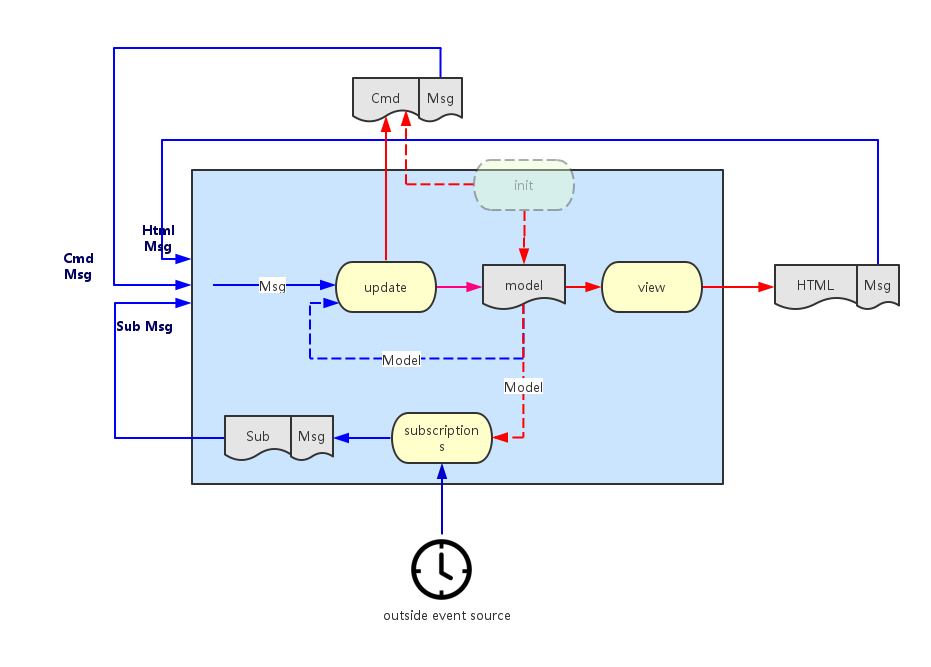
Elm 0.17 introduces significant breaking changes from the previous release.  FRP has gone, as have signals, but what has improved is a more coherent architecture using the key new concept of subscriptions to external services.  These are managed for you by the elm runtime and will return Cmd messages to you in exactly the same way as (for example) a view component will return a message.  The overall architecture is nicely summarised in this picture.

There is no doubt that this is a major improvement, but unfortunately elm is still severely lacking in one crucial area - integration with the web platform API.  Evan has indicated how it is likely that this might be achieved in the future with a small set of examples which include web sockets and which rely on a still undocumented feature named Effect Managers.

The unfortunate result of this is that, if you want (say) to use a platform API such as web-audio, you are still encouraged to do so using ports, which provide a subscription to javascript services. These have major drawbacks - you are not allowed to build a library if you use them and are thus debarred from publishing it as a community package. Nor can you build a simple single artefact for distribution by other means - the javascript produced by your module must be hand-assembled alongside that produced by the calling program.

So, a good many developers will be forced down the road of using ports to access the platform API and producing their own modules as  'pseudo-libraries' for getting the job done.

Modules

Whereas there is good documentation for showing you how to build modules there is less available on the subject of how to incorporate a module into your program, particularly if it uses ports.  The rest of this article gives an explanation of how this might be done.

Suppose your module encapsulates a widget that plays back midi recordings on a suitable instrument. It might look like this, with a start/pause and stop button and a capsule which shows the proportion of the tune that has been played:


The module will use web-audio to actually create the sounds and so will use ports to a javascript service.  It will export a module definition looking like this:

  
    module Midi.Player exposing (Model, Msg (SetRecording), init, update, view, subscriptions)

This is all as expected. The only subtlety is that the module exposes the SetRecording message type that allows the calling program to tell it which recording to play. The messages that respond to the player buttons are hidden and act autonomously.

Main Program

The following section describes how the calling program that (somehow) gets hold of a MIDI recording via the MIDI message might integrate the player:

import

  
    import Midi.Player exposing (Model, Msg, init, update, view, subscriptions)

model

 
   type alias Model =
     { 
       myStuff :....
     , recording : Result String MidiRecording
     , player : Midi.Player.Model
     }

messages

The program needs to send a message to the player which describes the midi recording to play. Otherwise, all player messages must simply be delegated to the player itself:
  
    type Msg
      = MyMessage MyStuff
      | Midi (Result String MidiRecording )  
      | PlayerMsg Midi.Player.Msg   

initialisation

It is important that the calling program allows the player to be initialised. The let expression gets hold of the player initialisation command and then the Cmd map function turns the module-level message into a program-level message. The exclamation mark function requires some explanation - it is used here as a shorthand to convert the model into the (model, Cmd Msg) tuple.
  
    init : (Model, Cmd Msg)
    init =
      let
        myStuff = ....
          (player, playerCmd) = Midi.Player.init recording
      in
        { 
          myStuff = myStuff 
        , recording = Err "not started"
        , player = player
        } ! [Cmd.map PlayerMsg playerCmd]

update

It is assumed that the program issues a message somehow to get hold of a MIDI recording which it then saves to the model with an incoming Midi message once it receives the response. Thereafter, all module-level messages are simply delegated to the module:
  
    update : Msg -> Model -> (Model, Cmd Msg)
    update msg model =
      case msg of

        MyMessage stuff -> ...

        Midi result -> 
          ( { model | recording = result }, establishRecording result )    

        PlayerMsg playerMsg -> 
          let 
            (newPlayer, cmd) = Midi.Player.update playerMsg model.player
          in 
            { model | player = newPlayer } ! [Cmd.map PlayerMsg cmd]
where establishRecording sends a command to the player which establishes the recording to play:
  
    establishRecording : Result String MidiRecording -> Cmd Msg
    establishRecording r =
      Task.perform (\_ -> NoOp) 
                   (\_ -> PlayerMsg (Midi.Player.SetRecording r)) 
                   (Task.succeed (\_ -> ()))

view

To see the player widget, you have to map the message onto the player view:
  
    view : Model -> Html Msg
    view model =
      div [] 
        [  
        myView ..
        ,  Html.map PlayerMsg (Midi.Player.view model.player) 
        ]

subscriptions

Similarly, you must map the subscriptions onto those of the MIDI player (alongside any subscriptions the program requires for other purposes):
  
    subscriptions : Model -> Sub Msg
    subscriptions model = 
      Sub.batch 
        [  mySubs ...
        ,  Sub.map PlayerMsg (Midi.Player.subscriptions model.player)
        ]

Final Integration

The complete source of the MIDI player module can be found here. An example of a final html file that integrates the javascript from the player module with that of a calling program named MidiFilePlayer can be found here.

Friday, March 11, 2016

Is elm a game-changer?

I'm a server-side developer. Whenever I venture into the web side of things, I'm faintly horrified at what I find - three disparate languages, ad hoc structure, events firing from different widgets often with no clear overall effect and so on. For me, the most frightening is javascript - I am sure there is a very competent functional language in there struggling to get out, but it's difficult to find.

Elm solves these problems. Html, css and javascript are simply encapsulated as pure functions, and all you need do is combine them together in straightforward ways and you get no surprises. All messages are routed sequentially through one single place, so that you simply pattern match on the signal stream and you thus retain control of your application's behaviour. Elm code compiles down to a safe subset of javascript in such a manner that you virtually never see any kind of runtime exception.  Also you get a very simple interactive development environment with truly informative compiler error messages.

This means that I can now approach the web tier in the same way that I approach the server tier - for the first time I'm feeling comfortable. I suppose this is elm's main value proposition - you can control both your application's look-and-feel and its behaviour and it's all in the context of a simple mental model.

But I want to approach things from left-field.  I'm less interested in how the application looks than in how it sounds.  Audio has been the poor relation in web programming for such a long time now, and elm is no exception.  However, once Evan comes clean about his plans for wrapping the web platform API, I fully expect audio to blossom in elm.  What I find exciting is that it's now possible to build, quite quickly, relatively sophisticated tools and have them run in the browser in a manner that I would previously have thought to be impossible.

Functional Parsers


I've now written two fairly substantial parsers - one for MIDI and the other for the ABC notation (which describes musical scores).  Both use the wonderful elm-combine  parser combinator library from Bogdan Popa. This has proven itself to be a great choice - not just because you can write practical parsers with it but also because of the great support Bogdan provides.

If you come from a javascript background, you're perhaps not too sure of what a functional parser is.  A traditional imperative parser is monolithic - it will usually employ a lexer for building tokens from the individual characters and a single parser for checking that the token stream fits the grammar and for building a parse tree.  By contrast, a functional parser is built from lots of very tiny parsers, combined together.  For example, you may have one that just parses a particular character sequence such as the word 'import' or another that just parses integers and so on.

It turns out that you can combine these little parsers together very simply.  Just to give one example, the ABC notation has a concept of a tuplet which is a generalisation of a triplet (three notes taking the time allotted to two) or a quadruplet (four notes taking the time allotted to three) and so on.  For example, a triplet for three successive notes on a keyboard from middle C would be notated as (3CDE.

You might want to represent it in a parse tree like this to imply that a tuplet consists of a signature part (e.g. 3 or 4) and a list of notes (e.g. A,B and C):
    
   type Music =
      Tuplet TupletSignature (List AbcNote)
    | ....

another way of looking at this is that Tuplet is a constructor function that builds a Music type and which has the signature:
    
    Tuplet : TupletSignature -> (List AbcNote) -> Music

Now, a parser for this part of the ABC language might look like this:
    
    tuplet : Parser Music
    tuplet = Tuplet <$> (char '(' *> tupletSignature) <*> many1 abcNote

I'm well aware that this looks like hieroglyphics and that elm discourages the use of infix operators like these but in the case of functional parsers, I think their use is entirely justified and, once you get used to them, makes life considerably simpler.

To deconstruct this statement - there are three primitive parsers - for the left bracket character, the tuplet signature (i.e. 3 or 4) and for a note in ABC notation (i.e. A, B or C). The abcNote parser is used with the many1 combinator which means that one or more instances of a note are recognised, producing a list. The *> and <*> operators mean that you process the parser at their left followed by the one on their right in sequence. The difference being that the first of these throws the left hand result away whilst retaining the right hand side result, whilst the second retains both results. So at this stage, we've successfully parsed (say) a triplet and retained the '3' and the 'ABC'. Finally, the <$> combinator just applies the Tuple constructor function we defined earlier to the two results, building the Music type. (All types are, however wrapped inside a Parser type). This is an example of what is called the applicative style.

The full parser for ABC is merely extends this technique to cover the entire grammar.

Web-Audio Players


Once you have a parse tree, it is then a relatively simple job to translate it into a set of instructions for playing each individual note (at the correct pitch and for the intended duration).  This can then be dispatched to web-audio so that the tune can be played.  Web-audio is supported in recent versions of most 'modern' browsers like Chrome,  Firefox and Opera.  Unfortunately, elm 0.16 has no simple way of integrating with javascript APIs like these and so you have to resort to the frowned-upon technique of wrapping a javascript integration layer inside an elm interface.  The hints coming from elm-dev suggest that this might be solved in 0.17. 

The net result of all this?  You can accept an ABC tune from a user, parse it, and if it is valid, play it immediately.  All this takes place in the browser.  All the applications that I know about that do this sort of thing do the processing on the server before returning something playable to the client.  So, my contention is that elm allows you to attempt applications in the browser that simply were not possible before (or at least not without superhuman effort).

If all this has given you a thirst for learning the ABC notation, there's an interactive tutorial here and an ABC editor here.  The code is here.


Tuesday, October 6, 2015

Elm and Web-MIDI

This post is about attempting to learn two new technologies and one old one.  The two new ones are Web-MIDI (which allows you to plug MIDI devices into your computer and do things with music in the browser) and the Elm programming language (which promises at last to bring some coherence to the challenge of writing web applications using the witches brew which is HTML, CSS and JavaScript).  The old one is in fact JavaScript itself - I've always avoided it like the plague but now I feel there is a reason for getting to grips with it.

Update for Elm 0.17

Now that Elm 0.17 has been released, the description of elm in this post no longer applies. Signals have been removed, the rules are starting to change for writing native modules.  From today (May 14th), I have deprecated elm-webmidi.

Web-MIDI

Considering how long MIDI has been in existence, you would think that handling it in browsers would be second-nature by now, but sadly this is not the case. Working draft 17 of the Web MIDI API was only published in March of this year, and at the time of writing, only Chrome has an implementation.  It is not a large document.  The most important features are illustrated by these two functions:
   
    function midiConnect () {
      // request MIDI access and then connect
      if (navigator.requestMIDIAccess) {
         navigator.requestMIDIAccess().then(onMIDISuccess)
      } 
    }

    // Set up all the signals we expect if MIDI is supported
    function onMIDISuccess(midiAccess) {
        var inputs = midiAccess.inputs.values();       

        // loop over any register inputs and listen for data on each
        midiAccess.inputs.forEach( function( input, id, inputMap ) {   
          registerInput(input);       
          input.onmidimessage = onMIDIMessage;     
        });      

        // listen for connect/disconnect message
        midiAccess.onstatechange = onStateChange;
    }  
The requestMIDIAccess function detects whether MIDI is supported in the browser and then hands control to an asynchronous function onMIDISuccess if it finds there is support. This allows you to discover all the MIDI input devices that are connected, to register them and also register a callback which will respond to MIDI messages provided by that device (for example key presses on a keyboard). You can handle MIDI output devices the same way, but I will not cover that here. Finally you can register another callback that listens to connection or disconnection messages as devices are unplugged or plugged back in to your computer.

Elm 0.16

Elm is a Functional Reactive Programming language.  It replaces the traditional callbacks used by JavaScript with the concept of a Signal. Such a signal might be, for instance, a succession of mouse clicks or keyboard presses - in other words it represents a stream of input values over the passage of time. What Elm forces you to do is to merge all the signals that you encounter in your program and then it routes this composite signal to one central place.  Here, a single function, foldp, operates which has the following signature:
   
   foldp : (a -> s -> s) -> s -> Signal a -> Signal s
This is a bit like a traditional fold, except it operates over time. It takes three parameters - (1) a function that knows how to update global state from an incoming value, (2) the current state and (3) an incoming signal - and then it composes all these together so that you get a signal for the overall state. Whereas the traditional JavaScript model would have you deal with a set of individual callbacks which would operate on the global state of your program in often incomprehensible ways (because it is so difficult to reason about when you're in the middle of callback hell), the Elm model simply requires you to hold global state and refresh it completely each time any signal comes in. That this approach doesn't slow reactivity down to a crawl is due to one thing - Virtual DOM. An abstract version of DOM is built rather than writing it directly, and this comes with clever diffing algorithms so that when you want to view your state as HTML, only a small amount of rewriting needs to occur.

In other respects, Elm Syntax is very like Haskell, but with occasional borrowings from F# for its composition operators. What is lacking, though, is Typeclasses. This means, for example, that you can't just use map to operate on lists - you have to preface is as List.map because Elm can't distinguish it from others such as Signal.map.

Elm-WebMidi

To build a MIDI library for Elm, you have to write 'Native' JavaScript code which takes each of the callbacks described earlier and turns them into Elm signals.  I'll say a little more about how this is done later on, but for now, assume that there are three separate signals with the following type signatures:
   
   -- a connection signal
   Signal MidiConnect

   -- a disconnection signal
   Signal MidiDisconnect

   -- a note signal
   Signal MidiNote
The data types MidiConnect, MidiDisconnect and MidiNote are simply tuples that gather together the appropriate attributes from the Web-MIDI interface. MidiConnect signals are emitted by the onStateChange callback for a new connection, but they are also emitted when the web application starts up if there happen to be any devices already attached. The library allows us to write an application which lists the various devices such as MIDI keyboards as they appear and disappear and which also displays each key as it is pressed alongside its parent device.

Anatomy of an Elm Application

This sort of application is perhaps slightly simpler than other sample applications that you see on the Elm examples page because there is no direct user interaction with any widgets in the HTML view - all interaction is via the MIDI device.  It uses a standard MVC pattern. The first step is to gather together each of the three input signals. A MidiMessage algebraic data type is used to represent this disjunction, each Signal is mapped to this common type and then the Signals are joined together with Elm's mergeMany function.
   
   type MidiMessage = MC MidiConnect | MN MidiNote | MD MidiDisconnect

   -- Merged signals
   notes : Signal MidiMessage
   notes = Signal.map MN midiNoteS

   inputs : Signal MidiMessage
   inputs = Signal.map MC midiInputS

   disconnects : Signal MidiMessage
   disconnects = Signal.map MD midiDisconnectS

   midiMessages : Signal MidiMessage
   midiMessages = mergeMany [inputs, notes, disconnects]

We then need a model to represent the global state that we wish to keep. This is merely a list of input devices, and associated with each one is an optional MIDI note:
   
   -- Model
   type alias MidiInputState = 
     { midiInput: MidiConnect
     , noteM: Maybe MidiNote
     }

   type alias MidiState = List MidiInputState

and, of course, we need a view of this state. Elm's HTML primitives help to keep this terse:
   
   -- VIEW
   viewNote : MidiNote -> String
   viewNote mn = "noteOn:" ++ (toString mn.noteOn) ++ ",pitch:" ++ 
                 (toString mn.pitch) ++ ",velocity:" ++ (toString mn.velocity)

   viewPortAndNote : MidiInputState -> Html
   viewPortAndNote mis = 
     case mis.noteM of 
       Nothing ->
          li [] [ text mis.midiInput.name]
       Just min ->
          li [] [ text ( mis.midiInput.name ++ ": " ++ (viewNote min)) ]

   view : MidiState -> Html
   view ms =
     div []
       [ let inputs = List.map viewPortAndNote ms
         in ul [] inputs
       ] 
The main program applies the foldp function to produce each new state, and displays it with the view function. The initial state is just the empty list:
   
   -- Main
   midiState : Signal MidiState
   midiState = Signal.foldp stepMidi initialState midiMessages

   main : Signal Html
   main = Signal.map view midiState
All that's left to describe is the stepMidi function that recomputes the global state as each signal arrives. It deconstructs the signal into its original components using pattern-matching:
  
   stepMidi : MidiMessage -> MidiState -> MidiState
   stepMidi mm ms = 
      case mm of 
        -- an incoming MIDI input connection - add it to the list
        MC midiConnect -> 
           { midiInput = midiConnect, noteM = Nothing } :: ms
        -- an incoming note - find the appropriate MIDI input id, add the note to it
        MN midiNote ->
           let updateInputState inputState =
             if midiNote.sourceId == inputState.midiInput.id 
               then 
                 { inputState | noteM <- Just midiNote }
            else 
              inputState          
        in
           List.map updateInputState ms     
        -- a disconnect of an existing input - remove it from the list
        MD midiDisconnect ->
           List.filter (\is -> is.midiInput.id /= midiDisconnect.id) ms

Writing a Native Elm Module

There seems, as yet, to be very little documentation about how to go about this. The best approach is probably to look through the core Elm libraries on Github and adopt the conventions that these exemplify. You will need to make use of the common Runtime JavaScript that Elm will pass you and which allows access to the core features - for example List and Signal. In the Elm-WebMidi library, I made use of two main features. Firstly, Elm tuples are simply JavaScript objects with a discriminator labelled 'ctor' with the value (say) '_Tuple5' for a 5-member tuple. Secondly, signals can be built simply by using Elm.Native.Signal.make. The JavaScript then returns an object containing these three signals. Alongside the JavaScript, you need an Elm file that redefines this interface in Elm terms, but uses the JavaScript implementation. If you are interested, the Elm-WebMidi library and sample program can be found here.

Saturday, April 18, 2015

Reverse Engineering MIDI

I am very keen to expand the number of Scandi tunes that are saved to my tradtunedb site but I am finding that not enough people are posting tunes - largely because they are put off by the seeming complexity of the abc notation. One of my friends told me they'd find it a lot simpler if they could just play the tune on a MIDI keyboard and somehow get this automatically converted to abc. This got me thinking...

The Haskell School of Music

And then, by chance, I stumbled upon the Haskell School of Music (HSoM). This is a very comprehensive Haskell tutorial, chock-full of exercises, but where all the examples are taken from the field of music. It's the brainchild of Paul Hudak who is both one of the original designers of Haskell and also a keen musician. The book is a successor to his previous Haskell School of Expression, but to my mind it is a great improvement, partly because the treatment of the language is both clearer and deeper and partly because the exercises benefit from the common theme. Although HSoM is still very much a work in progress, it is remarkably comprehensive. It is split into two principal sections - the first part develops a domain-specific language for representing pieces of music and the second explores the generation, composition and analysis of musical signals which would allow you, for example, to design your own electronic instrument. All this is achieved by gradually introducing Euterpea, a computer music library developed in Haskell which supports the programming of computer music at both at the note level and the signal level.

Euterpea

Euterpea stems from a previous library also developed by Paul called Haskore and is maintained on github. It has at its core the Music algebraic data type:
    
data Music a  = 
       Prim (Primitive a)               --  primitive value 
    |  Music a :+: Music a              --  sequential composition
    |  Music a :=: Music a              --  parallel composition
    |  Modify Control (Music a)         --  modifier
  deriving (Show, Eq, Ord)
where Control is represented like this:
 
data Control =
          Tempo       Rational           --  scale the tempo
       |  Transpose   AbsPitch           --  transposition
       |  Instrument  InstrumentName     --  instrument label
       |  Phrase      [PhraseAttribute]  --  phrase attributes
       |  Player      PlayerName         --  player label
       |  KeySig      PitchClass Mode    --  key signature and mode
  deriving (Show, Eq, Ord)
The Control type allows you to insert a variety of modifying instructions - usually at the phrase level (for example you can transpose a tune, pick an instrument or indicate dynamic markings) but otherwise Music is extremely straightforward. Primitives represent the notes (or rests) themselves and you can compose phrases together either serially or in parallel. This is simple but powerful - for example if you compose individual notes in parallel, you get a chord, if you compose whole phrases of notes in parallel you can define different melodic lines, perhaps played on different MIDI instruments.

What is particularly useful is that Euterpea comes with functions to convert between MIDI and this Music data type. This is a good deal more attractive to work with - all you really get from MIDI is an instruction to turn a note on in a particular manner and then later to turn it off again. Euterpea manages the conversion by prefacing each note in the tune with a rest whose length is identical to the offset of the note in the tune and then composing all these two-item phrases in parallel. It thus becomes relatively easy, when trying to produce scores, to identify the notes that start each bar, although no bar indications are present in the Music data type itself.

As yet, Euterpea provides no help at all for producing a score of any kind from Music. It has a notion of a function that would provide notation called NotateFun but this is unimplemented.

Producing Scores

When you want to produce a performance of some kind from Music, things are relatively straightforward. Music is expressive enough to combine different notes together in any manner you wish and Control allows you to plug in your own modifiers, letting you express your own interpretation of the performance. But when you want to go in the opposite direction, things get trickier because the translation into MIDI is lossy - you lose nearly all the contextual information originally applied to phrases.

Accordingly, I don't want to be too ambitious in trying to recreate an abc score. I will limit myself to monophonic MIDI files and to relatively straightforward Scandi tunes with just a single melody line. On the whole, these tend to be in standard rhythms but the most prevalent is the polska. These are normally written in 3/4 time but are not waltzes - they have an emphasis on the first and third beats of the bar. They come in various forms: the slängpolska is straightforward, dividing each beat into semiquavers:
the triplet polska, as its name suggests, tends to divide each beat into triplets.
You would think that 9/8 would be a better representation (as in Irish slip jigs) but by convention, 3/4 is normally used. This means that if you offer the choice of time signature, you have more work to do in the translation of these polskas into 3/4 because you have to invoke the special abc triplet notation which is used whenever three notes take the time allotted to two. This must also be done for another very common polska form - the so-called short first beat polska where three notes are played as a regular triplet lasting the first full two beats in the bar.

Representing Scores

Scores will be represented in an algebraic data type Score:
    
data Score a = EndScore
             | Bar Int (Notes a) (Score a)
        deriving (Show, Eq, Ord)

data Notes a = PrimNote a
             | (Notes a) :+++: (Notes a)    -- a group of notes
             | Phrase (Tuplet a)            -- a duplet, triplet or quadruplet
        deriving (Show, Eq, Ord)

-- here Rational defines the type of Tuplet - 
-- (2/3) is two notes in the time of three (duplet) 
-- (3/2) is three notes in the time of two (triplet) 
-- (4/3) is four notes in the time of three (quadruplet) 
data Tuplet a = Tuplet Rational [a]
        deriving (Show, Eq, Ord)
As with Euterpea, it is polymorphic in the type of note being represented, allowing you to start with Euterpea's representation and end with one more suited to abc. Although very simple, it is sufficient to represent the set of notes in an abc score given the restrictions mentioned above - so for example I have dispensed with the parallel constructor because I am only interested in single line melodies. Other properties of the score such as time signature or key signature are carried by abc as headers and so are represented separately - simply as configuration properties.

Imposing Structure

Transformation from MIDI to abc is now a matter of attempting to apply more and more structure to the set of raw notes that you start with. Here are some of the key elements:

Note Duration

Euterpea uses fractional durations but abc uses integral durations. It's sensible to unify on a smallest duration of 1/96th note. This is convenient because it is small enough not to lose precision but has both 3 and 4 as factors and so can be used to represent notes in triplets and quadruplets. A bar of 4/4 music will occupy 96 such measures and we can deduce the length of the smallest note we can reliably detect (for example a 1/32 note occupies 3 measures) which we can call the shortest detectable note.

Bar Lines

MIDI has a notion of time signature and from this and the rounded note durations and offsets we can work out where the bar lines are intended and thus invoke the Bar constructor. If a note spreads across such a bar line, we have to split it into two notes linked with a tie, itself notated as a note type. We can then label all the bars in the score monotonically from zero. This also gives us a mechanism for issuing end of line markers to spread the score out evenly if we issue them regularly after a certain count of bars. We can also work out where the beats in the music occur and mark each note as either on or off the beat. This helps us to separate note phrases in the abc.

Long Notes

When we unify a note's duration, we may find it has a length (say) of (5/8) or (7/8). This is impossible to notate as a single entity and so we again split into two notes which we now can notate, joined by a tie.

Tuplets

If a note does not consist of an exact number of shortest detectable note durations, it is a candidate for embedding in a tuplet. This is true for quadruplets (having a note duration of 3/32) and triplets (having a note duration of 1/12). In addition, duplet notes have a duration of 3/16. We then continue to add neighbouring notes to the tuplet until the total duration is equal to that of an even number of beats.

Pitches

MIDI is specific about pitches - F# is always F#. However, its display in a score depends on the key signature. In the key of C Major it would be shown as F# but in the key of G Major it would be shown simply as F, inheriting its 'sharpness' from the key signature. Conversely, an F natural note in this key is required to be explicitly marked as a natural. To handle this translation it seems sensible to generate a chromatic scale of notes for each possible key and then to translate simply by lookup into this list. MIDI also has a notion of octave which can be directly translated into an abc octave marker.

You also need to pay attention to the way accidentals are represented in the score. Once an accidental is marked in any particular bar, you no longer need to mark further instances of the note explicitly that occur later in the bar, because they inherit their pitch markers from the previous instance.

Articulation

MIDI has no concept of rests, which only exist as gaps between successive notes. This means we need a heuristic which will somehow discriminate between cases where a note decays earlier than intended and where a legitimate rest is indeed intended. Our approach is to identify all such gaps, and where the duration is longer than the shortest detectable note, to insert a rest, otherwise to extend the preceding note by the gap's duration.

Code

The first phase of the project uses MIDI files that themselves were computer-generated (in fact from abc) and so are very regular in rhythm. If you are at all interested, the code is here. A web interface to the midi translation is here.

Sunday, October 19, 2014

Downloading Resources from Cross-Origin Requests

If you decide to have a separate web- and backend- tier, cross-origin HTTP requests cause no end of difficulties in a variety of unlikely ways. I've written before about using CORS headers to mitigate some of them but here's yet another. It surfaces whenever you try to use the download attribute in an anchor tag but where the URI resource lives on the backend and not the web server. For example, I host tunes on my server and I want users to be able to download the tune scores which are in pdf format:
    
  download pdf
The intention is that when the user selects the link, the browser will know that the resource is intended to be downloaded and will use the download attribute value as the file name. This indeed happens when the resource is hosted locally, but it no longer does so in the most recent versions of Chrome when it's hosted remotely. It seems as if the Chrome developers have now implemented a rather awkward algorithm in the html5 spec designed to mitigate possible security dangers in downloading files from untrusted sites. This is ostensibly because a hostile server could try to inveigle a user into unwittingly downloading private information (thinking it came from the hostile server itself) which could then perhaps be re-uploaded to that server. The solution is to use the Content-Disposition HTTP header when serving up the resource to suggest a file name. For example:
    
  Content-Disposition: attachment; filename=mytune.pdf
Conforming browsers should then use this name when they interpret the download attribute in the anchor tag.

Friday, August 29, 2014

Functional Programming in Scala

Richard Feynman said what I cannot create I do not understand, notoriously misquoted by Craig Venter as what I cannot build I do not understand when he inserted it as a watermark into the DNA of his bacterium with an artificial genome. But Venter has a software engineering approach to biology - the bacterium has a computer for a parent and he went through a series of debugging cycles before eventually the organism would 'boot-up'. His statement is fundamental to the proper understanding of all sorts of disciplines, but non more so than software development.

Manning have today published Functional Programming in Scala by Rúnar Bjarnason and Paul Chiusano. The book is constructed around a carefully graded sequence of exercises where you find yourself attempting to build things of increasing complexity. It's aim is to teach functional programming concepts through the medium of Scala and this means that you must construct your programs from pure functions, free of side effects.  If, like me, you come from an OO background, this causes a massive rethink - there are whole swathes of the language that you just don't use.  For example, you can't reassign a variable; your functions mustn't throw exceptions; you will not develop class hierarchies.  You will use case classes but their use is restricted to the creation of algebraic data types. I found that I had to go through the exercises very slowly and deliberately.  The introductory exercises are relatively straightforward and fun to attempt and your confidence grows, but I found that the material quite soon becomes very challenging indeed.  In fact, whilst studying the various revisions of this book, I was reminded yet again of Feynman - his algorithm:
    Write down the problem.

    Think real hard.

    Write down the solution.
This, as opposed to an approach I've tended to used in OO:
   
    Write down the problem.

    do {
        Think a little bit.

        Type a little bit.

        See what happens

    } until problem solved.

    Write down the solution.  
The problem when lesser mortals attempt Feynman's algorithm is that it tends not to terminate. When it works, however, you often tend to end up with an elegant, terse solution, often incomprehensible to the casual reader. But the main thing is that you gain enormous understanding - you will get no benefit unless you attempt the exercises.

The material is presented tersely, with just enough explanation of the concept and the scala syntax you need to express it.  Some of the problems are very tricky and I would occasionally find myself pondering single questions for an hour or two, struggling to get the types to match.  The satisfaction when you do tease out a solution is immense.  The accompanying material on the web site includes pro-forma Scala exercise files for each chapter with placeholders for the answer, usually in the fom of stubs like this:
    def compose[A,B,C](f: B => C, g: A => B): A => C =
        ??? 
If you get stuck, hints and solutions for each question are provided, as is a fully fleshed-out answer file for each chapter.  Some later chapters use material developed in earlier ones and so, when attempting a new chapter, you need either to have completed the previous ones or to compile the supplied answers before you can proceed.

There are four main sections. The first is an introduction to FP concepts and the authors have given a lot of thought to the progression of ideas.  This allows you gradually to gain confidence in manipulating functions until finally you're able to develop a lazily-evaluated Stream data type and then a purely functional representation of State. If you just get this far, it's of tremendous benefit.

Then the style of the book changes tack to some extent in three chapters devoted to functional design.  The idea is to illustrate some of the thought processes and alternative approaches that can be involved in groping your way towards the development of a combinator library that tackles a particular design space. Three completely different problems (parallelism, test frameworks and parsers) are used. This is illuminating but sometimes a little at odds with the progression of exercises because your approach and the authors' may legitimately diverge.  This means you may occasionally have to look ahead to the answers to keep yourself on track. What is interesting here is that the three different areas evolve solutions with a deep structure in common and you develop something of an intuition of what it is that makes Monads inevitable.

The third section then discusses Monoids, Monads, Functors and Applicatives.  This is familiar territory if you've read Learn You a Haskell but there is considerably more depth of coverage, and because you've spent so much time thinking about the diverse design problems in the previous section, you may well find that your understanding of these deep abstractions takes a more tangible form.

Section 4 deals with the question - if your program is completely pure, how do you deal with an effect such as IO?  There are many aspects to this and the authors review the strengths and limitations of the IO Monad and discuss different alternatives to the problem of handling mutable state. The book ends with a fascinating chapter on Streaming IO.  This was a brave thing to do - the discussion is exploratory in style and feels its way towards a thorough explanation of the design principles behind the scalaz-stream library. It seems as though the chapter might have been developed in parallel with the development of the library itself and you almost think that you are one of the team. Surprisingly, no mention is made of scalaz, however you will learn many of the design principles that underpin it.  (This won't give you everything you need for the scalaz syntax, though.  For this, I would recommend learning-scalaz.)

This is a book which has already taught me a great deal and given me a huge amount of pleasure.  It is one that I will keep going back to until I finally feel that I am getting the hang of that mysterious activity which is called functional programming.
 

Friday, May 16, 2014

A SKI Calculator

I have recently been attempting the exercises in Raymond Smullyan's to mock a Mockingbird. This is a gentle and enjoyable introduction to combinatory logic. He chooses an applicative system of combinators where the objects are birds and so he names them combinator birds. They live in variety of different forests where the inhabitants of each forest have distinctive characteristics.

Combinator Birds

Here are some examples of Smullyan's birds:
  Bluebird: Bxyz = x(yz)
  Cardinal: Cxyz = xzy
  Warbler:  Wxy = xyy
  Identity: Ix = x 
These are conventionally written in a form which minimises the bracketing because the terms are considered to be left-associative. They can be re-written in a normal form which makes the association explicit - for example:
  Cardinal: Cxyz = (xz)y
  Warbler:  Wxy = (xy)y
In the early chapters you learn that you can build all the other birds in a forest by applying birds to other birds. In fact, the birds shown above (BCWI) form the basis for a whole class of birds, and this class can also be generated from a different set (BTMI). More strangely, you can build all the birds you need from just two:
  Starling: Sxyz = xz(yz)
  Kestrel:  Kxy = x
It is very easy to generate the Identity bird from these two, and conventionally you use all three to generate the others - hence the name SKI Calculus. The real interest is that this is a Turing-complete language - a fact that has been used in an elegant piece of work to show that the Scala type system is Turing-complete. But this is not my object here - rather it is to take up Smullyan's challenge on page 178 to write a program that converts any combinator bird to a SKI bird. It also makes sense to write an interpreter for a SKI bird so that when it is applied to the appropriate variables (x,y,z etc.) then the original combinator bird is reconstituted. The puzzles in chapter 18 lead you to discover a deterministic algorithm for doing this which Smullyan sketches out in the answers (although be careful - unfortunately his explanation contains a couple of typos).

Parse Tree

A combinator bird is best represented by a binary tree which can distinguish between the bracketed forms in the following way:

This tree can be generated with the following very simple grammar which recognizes birds in normal form:
   expression ::= term term | term 
   term ::= terminal | bracket
   bracket ::= "(" expression ")" 
   terminal ::= "x"| "y" | "z" | "w" | "v" 
A parse tree in Scala then is of course:
   trait Tree
   case class Leaf(value: String) extends Tree
   case class Node(left: Tree, right: Tree) extends Tree
It is then straightforward to build a parser using the parser combinator library - but be careful - this has been moved to its own jar in Scala 2.11 - scala-parser-combinators_2.11.

α-Elimination

The algorithm that converts a combinator bird to a SKI bird takes one variable at a time, starting with the outermost variable and removes it progressively from each node in the tree until it vanishes - being replaced by a tree of S,K and I. This process is called α-elimination and is an entirely mechanical process which involves invoking any or all of four Principles which are encoded as follows:
   // α-elimination of α alone is I (Iα=α)
   private def principle1 = I

   // α-elimination of X (α not in X) is KX (KXα=X)
   private def principle2(t: Tree) = Node(K,t)

   // α-elimination of Yα (α not in Y) is Y (Yα=α)
   private def principle3(t: Tree) = t

   // α-elimination of XY (X an Y both α-eliminations) is SXY
   private def principle4(l: Tree, r: Tree) =  Node(Node(S,l),r)
where we have:
   object SKINodes {
     val S = Leaf("S")
     val K = Leaf("K")
     val I = Leaf("I") 
   }
This is not a very efficient algorithm because you have to look down the tree to detect whether the α-variable you are trying to replace exists in each branch, and it may not find the optimal SKI representation, but it is entirely deterministic and once you have replaced each variable you obtain a tree where the leaf nodes contain only S, K or I leaves.

SKI Interpretation

To interpret a SKI tree, you attach it to the required variables at its apex and then walk the tree. I have chosen a left side tree walk where I continue translating each branch until (on looking down it) all SKI nodes have been replaced. At each re-write I effectively apply the left hand operator to the right-hand tree. Because I am dealing with a binary tree but the S and K operators require more than one parameter, I accumulate 'partial' operators flowing up the tree until they are fully satisfied. This is done by adding extra transient nodes to the tree:
  // transient nodes used in SKI interpretation - essentially representations
  // of partial application of S, K or I
  case object S0 extends Tree
  case object K0 extends Tree
  case object I0 extends Tree
  case class K1(child: Tree) extends Tree
  case class S1(child: Tree) extends Tree
  case class S2(left: Tree, right: Tree) extends Tree
Again, this algorithm is not extremely efficient because of the look-ahead, but appears to be deterministic (certainly for the class of birds in Smullyan's forest). It will run out of stack space for outrageously complex birds because I have not bothered to preserve stack space by means of tail recursion or trampolining. If you are interested, the code is here.

Wednesday, December 4, 2013

Lenses in Scala

I have just got back from Scala eXchange 2013 where the initial keynote session was from Simon Peyton Jones on Lenses: Compositional data access and manipulation. A presentation in pure Haskell was, in fact, quite a heavyweight start to a Scala conference. However, it turned out to be a lucid explanation of a beautiful abstraction, and one which, at first sight, would appear to be impossible to arrive at given the apparent inconsistency of the types. Have a look at Simon's presentation if you find time - it's well worth the effort.

A lens solves the problem of reading from, and updating, a deeply nested record structure in a purely functional way, but without getting mired in ugly, deeply nested and bracketed code. Anyway, the talk got me interested in finding out what was available with Scala. There seem to be two main contenders at the moment - from scalaz 7 and shapeless. I thought I'd compare the two, to see how they handle the simple name and address record structure used by Simon which is (in scala):
   case class Person (name: String, address: Address, salary: Int)
   case class Address (road: String, city: String, postcode: String)

   // sample Person
   val person = Person("Fred Bloggs", Address("Bayswater Road", "London", "W2 2UE"), 10000)

Lenses from Scalaz 7

A lens itself is a pretty simple affair, consisting only of a pair of functions, one for getting and another for setting the value that the lens describes, and doing this within the context of the container (i.e. the record). In scalaz, these are constructed with a good deal of boilerplate - there are two constructors available to you (lensg and lensu), one which curries the 'setting' function, and the other which does not:
    
   val addressLens = Lens.lensg[Person, Address] (
     a => value => a.copy(address = value),
     _.address
   )   
       
   // or
   
   val nameLens = Lens.lensu[Person, String] (
     (a, value) => a.copy(name = value),
      _.name
   )   
Notice that each lens is defined in terms of two types - that of the value itself and that of its immediate container. Typically, you would then have to get hold of a lens for every atomic value you might wish to access:
   
  val salaryLens = Lens.lensu[Person, Int] (
     (a, value) => a.copy(salary = value),
     _.salary
   )

   val roadLens = Lens.lensu[Address, String] (
     (a, value) => a.copy(road = value),
     _.road
   )

   val cityLens = Lens.lensu[Address, String] (
     (a, value) => a.copy(city = value),
     _.city
   )

   val postcodeLens = Lens.lensu[Address, String] (
     (a, value) => a.copy(postcode = value),
     _.postcode
   )
This soon becomes tedious. However, the true usefulness of lenses comes to light when you compose them:
   
  val personCityLens = addressLens andThen cityLens
  val personPostcodeLens = postcodeLens compose addressLens
i.e. you can stay at the top of your record structure and reach down to the very bowels just by using one of these composite lenses. Scalaz, of course, offers you a shorthand hieroglyphic for these composition functions. So you could write them:
   
  val personCityLens = addressLens >=> cityLens
  val personRoadLens = roadLens <=< addressLens
Now you have your lenses defined, you can use them like this:
  
  def get = salaryLens.get(person)
  // res0: Int = 10000

  def update = salaryLens.set(person, 20000)    
  // res1: Person = Person(Fred Bloggs,Address(Bayswater Road,London,W2 2UE),20000)

  def transform = salaryLens.mod(_ + 500, person) 
  // res2: Person = Person(Fred Bloggs,Address(Bayswater Road,London,W2 2UE),10500)

  def transitiveGet = personCityLens.get(person)
  //res3: String = London

  def transitiveSet:Person = {
    val person1 = personCityLens.set(person, "Wakefield") 
    val person2 = personRoadLens.set(person1, "Eastmoor Road") 
    personPostcodeLens.set(person2, "WF1 3ST")
  }
  // res4: Person = Person(Fred Bloggs,Address(Eastmoor Road,Wakefield,WF1 3ST),10000)
 
With scalaz, you also get good integration with the other type classes you might need to use. So, for example, lenses can be lifted to behave monadically because the %= method applies the update and returns a State Monad.:
  
  def updateViaMonadicState = {
        val s = for {c <- personRoadLens %= {"124, " + _}} yield c
        s(person)
      }
  //res13: (Person, String) = (Person(Fred Bloggs,Address(124, Bayswater Road,London,W2 2UE),10000),124, Bayswater Road)

Lenses from Shapeless

By contrast, Shapeless gets rid of all this boilerplate and allows for composition during the construction of the lenses themselves. It uses a positional notation to define the target field of each lens:
  
  val nameLens     = Lens[Person] >> 0
  val addressLens  = Lens[Person] >> 1
  val salaryLens   = Lens[Person] >> 2
  val roadLens     = Lens[Person] >> 1 >> 0
  val cityLens     = Lens[Person] >> 1 >> 1
  val postcodeLens = Lens[Person] >> 1 >> 2
These can then be used in pretty much the same way as Scalaz 7's lenses. The main difference is that mod becomes modify and function application is curried:
  
  def get = salaryLens.get(person)
  // res0: Int = 10000

  def update = salaryLens.set(person)(20000)    
  // res1: Person = Person(Fred Bloggs,Address(Bayswater Road,London,W2 2UE),20000)

  def transform = salaryLens.modify(person)( _ + 500) 
  // res2: Person = Person(Fred Bloggs,Address(Bayswater Road,London,W2 2UE),10500)

  def transitiveGet = cityLens.get(person)
  // res3: String = London

  def transitiveSet:Person = {
    val person1 = cityLens.set(person)("Wakefield") 
    val person2 = roadLens.set(person1)("Eastmoor Road") 
    postcodeLens.set(person2)("WF1 3ST")
  }
  // res4: Person = Person(Fred Bloggs,Address(Eastmoor Road,Wakefield,WF1 3ST),10000)
As far as I can make out, Shapeless doesn't offer any monadic behaviour.

Which One to Use?

It seems to me that if you're tempted to use lenses, removal of boilerplate is critical. As yet, this doesn't seem possible with Scalaz 7, but I'm sure it's only a matter of time. There are other initiatives as well, for example, macrocosm, an exploration of scala macros, has dynamic lens creation, as does Rillit. But for me, at the moment, Shapeless seems astonishingly elegant.

Sunday, September 29, 2013

CORS Support in Spray

My tradtunedb service is working nicely, but there is a problem with it.  In order to hear a midi tune being played, it has to be rendered.  At the moment, this is done by converting it to a wav file on the server - an expensive process which doesn't scale well.  A better solution is to render the tune in javascript on the browser - but this presents a further problem.  The architecture is such that the front- and back-end have different host names.  And this means that the browser will prevent an XMLHttpRequest to the back-end because of potential security breaches.

Why CORS?

Browsers all maintain a same-origin policy.  One reason this is necessary is that XMLHttpRequest passes the user's authentication tokens. Suppose he is logged in to theBank.com with basic auth and then visits untrusted.com. If there were no restrictions, untrusted.com could issue its own XMLHttpRequest to theBank.com with full authorisation and gain access to that user's private data.

But a blanket ban on cross-origin requests also prohibits legitimate use.  For this reason, most modern browsers support Cross-origin resource sharing (CORS). . This is a protocol which allows the browser to negotiate with the back-end server to discover whether or not such requests from 'foreign' domains are allowed by the server, and to make the actual requests.

When browsers issue requests, they always include the Origin header.  The essence of the protocol is that the server will respond with an Access-Control-Allow-Origin header if that Origin is acceptable to it.  Browsers will then allow the access to go ahead.  For example, here we have an XMLHttpRequest emanating from a script named midijs and hosted on a server running on localhost:9000:
Accept:*/*
Accept-Encoding:gzip,deflate,sdch
Accept-Language:en-GB,en-US;q=0.8,en;q=0.6
Cache-Control:no-cache
Connection:keep-alive
Host:192.168.1.64:8080
Origin:http://localhost:9000
Pragma:no-cache
Referer:http://localhost:9000/midijs
User-Agent:Mozilla/5.0 (X11; Linux x86_64) AppleWebKit/537.36 (KHTML, like Gecko) Ubuntu Chromium/28.0.1500.71 Chrome/28.0.1500.71 Safari/537.36
And here is a response from a back-end server that accepts the Origin:
Access-Control-Allow-Credentials:true
Access-Control-Allow-Origin:http://localhost:9000
Content-Length:2222
Content-Type:audio/midi; charset=UTF-8
Date:Sun, 29 Sep 2013 09:13:03 GMT
Server:spray-can/1.1-20130927
This is all that is necessary for GET requests.  Security issues are greater for requests that are not used for pure retrieval and/or where user credentials are supplied.  Here, CORS provides additional headers and a 'preflight request' mechanism which asks permission from the server before it makes the actual request. For more details see http://www.html5rocks.com/en/tutorials/cors/

CORS Support in Spray

The M8 release versions of Spray have no CORS support.  Initial support for the CORS headers has now been integrated into the forthcoming release of Spray. These can be accessed if you develop your own CORS directive which makes use of respondWith directives in order to set the appropriate headers. For example, here's an approach based on that of Cristi Boarlu that works very well:
import spray.http._
import spray.routing._
import spray.http.HttpHeaders._

trait CORSDirectives  { this: HttpService =>
  private def respondWithCORSHeaders(origin: String) =
    respondWithHeaders(      
      HttpHeaders.`Access-Control-Allow-Origin`(SomeOrigins(List(origin))),
      HttpHeaders.`Access-Control-Allow-Credentials`(true)
    )
  private def respondWithCORSHeadersAllOrigins =
    respondWithHeaders(      
      HttpHeaders.`Access-Control-Allow-Origin`(AllOrigins),
      HttpHeaders.`Access-Control-Allow-Credentials`(true)
    )

  def corsFilter(origins: List[String])(route: Route) =
    if (origins.contains("*"))
      respondWithCORSHeadersAllOrigins(route)
    else
      optionalHeaderValueByName("Origin") {
        case None => 
          route        
        case Some(clientOrigin) => {
          if (origins.contains(clientOrigin))
            respondWithCORSHeaders(clientOrigin)(route)
          else {
            // Maybe, a Rejection will fit better
            complete(StatusCodes.Forbidden, "Invalid origin")
          }      
        }
      }
}
And this is how it can be used in my case to protect a route which generates a response for a path that requests a particular file type (e.g. midi):
path(Segment / "tune" / Segment / Segment ) { (genre, tuneEncoded, fileType) =>  
  get { 
    val contentTypeOpt = getContentTypeFromFileType(fileType:String)
    if (contentTypeOpt.isDefined) {
      respondWithMediaType(contentTypeOpt.get.mediaType) { 
        corsFilter(MusicRestSettings.corsOrigin) {
          val tune = java.net.URLDecoder.decode(tuneEncoded, "UTF-8") 
          val futureBin = Tune(genre, tune).asFutureBinary(contentTypeOpt.get)
          _.complete(futureBin)
        }
      }
    }
    else {
     failWith(new Exception("Unrecognized file extension " + fileType))
    }
  } 
} ~    
There is also a discussion started by Tim Perrett which hopes to be able to wrap routes within a cors directive which will just 'do the right thing' with preflight requests and appropriate access control headers as unobtrusively as possible.

If you want to try this out yourself, you can try one of the release candidates that were published on October 23rd.

Embedded YouTube Videos and Chrome

I have just discovered a related problem to do with rendering embedded YouTube videos in Chrome. I want to extend my trad tunes web site with a comments page attached to each tune. The foot of the page will contain a form allowing the user to add a comment to the page, and this is particularly useful if she finds a video where the tune is being played. YouTube allows you to embed the video into the page which it manages by means of an iframe. Unfortunately, when she posts the tune, Chrome won't display it until the page is refreshed (although all other major browsers will). Instead it reports:
The XSS Auditor refused to execute a script in 'http://localhost:9000/genre/agenre/tune/atune/comments' because its source code was found within the request. The auditor was enabled as the server sent neither an 'X-XSS-Protection' nor 'Content-Security-Policy' header.
What's happening is that the browser must run javascript code to render the iframe, and it again thinks that it emanates from the server that provided the page which is thus making a cross-origin request. In this case, the solution is to add a request header instructing the browser to suspend the XSS Auditor check when it process the page. This is achieved with the X-XSS-Protection header. For example, the Play Framework Action that processes a valid comment might respond like this:
  
    val comment = commentForm.bindFromRequest.get
    commentsModel.add(comment)
    Ok(views.html.comments(commentsModel.getAll, commentForm, genre, tune)(userName)).withHeaders("X-XSS-Protection"->"0")
When Chrome sees this header, it immediately renders the video. Note, this technique doesn't work if you issue a redirect instead of responding directly.

Wednesday, July 31, 2013

Running a Play 2 Application as a Debian Service

Debian Services

If you have developed your Play app, you then need a straightforward way to deploy and administer it in your production Linux environment. The conventional way to do this is to install it as a service, which means you can ensure it starts automatically when the server starts and your system administrators will know how to stop or restart it or check its status. This is an area where the Play documentation seems to be lacking. Here's how I approach things.

Tanukisoft Wrapper

The Tanukisoft Wrapper takes much of the pain away from the work of converting a JVM application into a well behaved service.  You need to downloaded a version appropriate to your target machine, then pretty much all you have to do is name your service and edit a single configuration file - wrapper.conf.  This lets you set the classpath, the application main class, the JVM parameters, the logging levels and so on.  There are then various mechanisms for converting your application into a service but by far the simplest is to to use WrapperSimpleApp as your main class in wrapper.conf and let this hand off to Play's main class by setting it as the first application parameter.  You also have a skeletal startup shell script which you rename to the name of the service you wish to use. So for example you can then invoke your application from the bin directory using
./myservice stop
./myservice start
./myservice status
and so on.

Integrating with Play

The play dist command builds a zip file containing all the dependencies which it used to place in the dist directory but since 2.2.0 puts in target/universal. With my tradtunestore application, it builds:


As you can see, all the dependent jars are placed in tradtunestore-1.1-SNAPSHOT/lib and there is also a start script which shows that the main class is named play.core.server.NettyServer.  We are going to ignore this script because we are replacing it with Tanuki.  All you have to do now is extract the contents of the zip file and place it into your Tanuki lib directory.  Now you configure wrapper.conf to pick up all these jars in the classpath and invoke the NettyServer as the sole app wrapper parameter. Here's the relevant section that describes the Java application:

#********************************************************************
# Java Application
#  Locate the java binary on the system PATH:
wrapper.java.command=java
#  Specify a specific java binary:
set.JAVA_HOME=/usr/lib/jvm/jdk1.7.0
wrapper.java.command=%JAVA_HOME%/bin/java

# Tell the Wrapper to log the full generated Java command line.
wrapper.java.command.loglevel=INFO

# Java Main class.  This class must implement the WrapperListener interface
#  or guarantee that the WrapperManager class is initialized.  Helper
#  classes are provided to do this for you.  See the Integration section
#  of the documentation for details.
wrapper.java.mainclass=org.tanukisoftware.wrapper.WrapperSimpleApp

# Java Classpath (include wrapper.jar)  Add class path elements as
#  needed starting from 1
wrapper.java.classpath.1=../lib/*.jar
wrapper.java.classpath.2=../lib/tradtunestore-1.1-SNAPSHOT/lib/*.jar

# Java Library Path (location of Wrapper.DLL or libwrapper.so)
wrapper.java.library.path.1=../lib

# Java Bits.  On applicable platforms, tells the JVM to run in 32 or 64-bit mode.
wrapper.java.additional.auto_bits=TRUE

# Java Additional Parameters
wrapper.java.additional.1=-Dconfig.file=../conf/application.conf

# Initial Java Heap Size (in MB)
#wrapper.java.initmemory=3

# Maximum Java Heap Size (in MB)
#wrapper.java.maxmemory=64

# Application parameters.  Add parameters as needed starting from 1
wrapper.app.parameter.1=play.core.server.NettyServer

init.d

The final step is to install the service into init.d.  With Tanuki, this is simple - from your Tanuki bin directory, enter:
sudo ./myservice install
You can then control the service using:
sudo service myservice stop
sudo service myservice start
sudo service myservice status
and so on from any directory.

Wednesday, July 10, 2013

Spray Migration

Firstly, apologies for having been silent for such a long time - I've been looking after my parents who were ill and are now, thankfully, recovered. I'd like to say a huge thank-you to Pinderfields Hospital in Wakefield, Yorkshire for saving my dad's life.

Since I've been away, the Scala ecosystem has been moving on unabated. We now have the final release of Scala 2.10.2 and I've been anxious to upgrade my RESTful music application accordingly. This has been enjoyable, but has taken longer than expected, largely because Spray underwent a huge refactoring at version 1.0-M3 which incorporated lots of breaking changes. As of this writing, the current release is labelled 1.2-M8 and is consistent with Akka 2.2.0-RC1. Other libraries that I use have changed too, but Spray has caused the most impact because the application concentrates on content negotiation and Spray has altered this considerably.

The New Spray

So much is new.  The documentation has been completely overhauled and is now much more detailed. If you look at its navigation panel you can get an idea of the massive refactoring into a new module structure that has taken place. Both the github repository and the Spray repo have moved.  Packages have been renamed from “cc.spray...” to simply “spray...” and the group id has changed from “cc.spray” to “io.spray”.  There is a new DSL for testing routes. However, the changes with the biggest impact for me have been those to do with (un)marshalling (which has been moved to the new spray-httpx module) and those handling authentication.

Marshalling

You now use the Marshaller.of method to create a marshaller for a particular type (and which can be picked up implicitly in the routing). For example, if I want to create a marshaller for a handful of different binary types that I use represented by BinaryImage:
  import spray.httpx.marshalling._
  import MediaTypes._

  class BinaryImage(mediaType: MediaType, stream: BufferedInputStream)

  implicit val binaryImageMarshaller = 
     Marshaller.of[BinaryImage] (`application/pdf`,
                                 `application/postscript`,
                                 `image/png`,
                                 `audio/midi`) {
       (value, requestedContentType, ctx) ⇒ {
           val bytes:Array[Byte] = Util.readInput(value.stream)
           ctx.marshalTo(HttpEntity(requestedContentType, bytes))     
           }
     }
Alternatively, if you have a type A with no marshaller, but you do have a marshaller for a type B, you can provide a marshaller for A by delegating to B's marshaller if you can provide a function from A to B. The definition is:
  def delegate[A, B](marshalTo: ContentType*)
                    (f: A => B)
                    (implicit mb: Marshaller[B]): Marshaller[A]

In my case, nearly all the content is represented as a type Validation[String, A] where the String type represents an error and A represents the various types of source or intermediate content. You can provide a meta-marshaller for a Validation which either handles the error or invokes the marshaller for the underlying type:
implicit def validationMarshaller[B](implicit mb: Marshaller[B]) =
    Marshaller[Validation[String, B]] { (value, ctx) ⇒
      value fold (
        e => throw new Exception(e),
        s ⇒ mb(s, ctx)
      )
    }

It seems rather infra dig to have to throw an exception from a Validation. At the moment it is necessary to do so because a Marshaller has no access to the HTTP response headers and so it is not possible (say) to marshall an error to a string-like content type if you've already told the marshaller that it's only dealing in binaries. However, Mathias from Spray has proposed introducing alternative Marshallers, one of which will have access to the headers in an upcoming release so this small blemish can then be removed.

Unmarshalling

Unmarshalling goes in the opposite direction and can be used to construct a user-defined type from a form submission. The interface here has changed a little too. For example:
  implicit val AbcUnmarshaller =
    Unmarshaller[AbcPost](`application/x-www-form-urlencoded`) {
      case HttpBody(contentType, buffer) => {         
        val notes =  new String(buffer, contentType.charset.nioCharset)
        AbcPost(notes)
      }
    }

As you can see, there is now a nice symmetry between Marshallers and Unmarshallers. They can be used within routes like this:
  post {    
    entity(as[AbcPost]) { abcPost =>     
       // do something

And as with marshallers, there are a whole set of basic unmarshallers provided and you can delegate between unmarshallers if you wish.

Authentication

This is another area where the API has changed and here the documentation is lacking. In my case, I need to perform simple authentication of a user name and password by checking with a backend database. This is best achieved by providing a UserPassAuthenticator. You construct one of these by passing it a function that takes an Optional UserPass and returns a Future which contains an Optional result. The standard approach is to return an encapsulation of the user name in a BasicUserContext if the validation passes and return None otherwise:
  val UserAuthenticator = UserPassAuthenticator[BasicUserContext] { userPassOption ⇒ Future(userPassOption match {
        case Some(UserPass(user, pass)) => {
            try {
              println("Authenticating: " + user + ":" + pass)
              if (TuneModel().isValidUser(user, pass) ) Some(BasicUserContext(user)) else None
            } 
            catch {
              case _ : Throwable => None
            }
        }
        case _ => None
      })
    }

I also need to identify the administrator user who has special powers. I do this by first using the UserAuthenticator to establish the login credentials and then composing this future with a check to establish the administrator name:
   
    val AdminAuthenticator = UserPassAuthenticator[BasicUserContext] { userPassOption => {
      val userFuture = UserAuthenticator(userPassOption)
      userFuture.map(someUser => someUser.filter(bu => bu.username == "administrator"))  
      }
    }

Once you have an authenticator, you can use it in routes like this:
   get {     
     authenticate(BasicAuth(UserAuthenticator, "musicrest")) { user =>    
       _.complete("user is valid")    
     }
   }

Testing

As an example of the new testing DSL, here is how you can test the authentication behaviour:
package org.bayswater.musicrest

import org.specs2.mutable.Specification
import spray.testkit.Specs2RouteTest
import spray.http._
import spray.http.HttpHeaders._
import StatusCodes._
import spray.routing._
import org.bayswater.musicrest.model.{TuneModel,User}

class AuthenticationSpec extends RoutingSpec with MusicRestService {
  def actorRefFactory = system
  
  val before = insertUser

  "The MusicRestService" should {
    "request authentication parameters for posted tunes" in {  
       Post("/musicrest/genre/irish/tune") ~> musicRestRoute ~> check 
         { rejection === AuthenticationRequiredRejection("Basic", "musicrest", Map.empty) }
    }
    "reject authentication for unknown credentials" in {
       Post("/musicrest/genre/irish/tune") ~>  Authorization(BasicHttpCredentials("foo", "bar")) ~> musicRestRoute ~> check 
         { rejection === AuthenticationFailedRejection("musicrest") }
    }
    "allow authentication for known credentials (but reject the lack of a POST body as a bad request)" in {
       Post("/musicrest/genre/irish/tune") ~>  Authorization(BasicHttpCredentials("test user", "passw0rd1")) ~> musicRestRoute ~> check 
         { rejection === RequestEntityExpectedRejection }
    }
    "don't allow normal users to delete tunes" in {
       Delete("/musicrest/genre/irish/tune/sometune") ~>  Authorization(BasicHttpCredentials("test user", "passw0rd1")) ~> musicRestRoute ~> check 
         { rejection === AuthenticationFailedRejection("musicrest") }
    }
    "allow administrators to delete tunes" in {
       Delete("/musicrest/genre/irish/tune/sometune") ~>  Authorization(BasicHttpCredentials("administrator", "adm1n1str80r")) ~> musicRestRoute ~> check 
         { entityAs[String] must contain("Tune sometune removed from irish") }
    } 
  }
   
  def insertUser = {
   val dbName = "tunedbtest"
   val collection = "user"
   val tuneModel = TuneModel()
   tuneModel.deleteUser("test user")
   tuneModel.deleteUser("administrator")
   val user1 = User("test user", "test.user@gmail.com", "passw0rd1")
   tuneModel.insertPrevalidatedUser(user1)    
   val user2 = User("administrator", "john.watson@gmx.co.uk", "adm1n1str80r")
   tuneModel.insertPrevalidatedUser(user2)    
  }
   
}

Tuesday, September 25, 2012

Scala Play Framework and Form Validation

Now that the web service is just about complete, I need to provide a web frontend. For this, I have chosen the Scala Play Framework (v 2.03). The tutorial introduction for this is excellent and, on the whole, Play 'just works' as advertised. The one slight problem I had was in working out how to do cross-field validation on a form. Validating individual fields is very simple. For example, you might define a form for collecting new user details and provide a regex constraint that determines what a well constructed name should look like:

val registrationForm = Form(
    mapping (
      "name" -> (text verifying (pattern("""^[A-Za-z]([A-Za-z0-9_-]){5,24}$""".r, error="Names should start with a letter, be at least 5 characters, and may contain underscore or minus"))),
      "email" -> .....

Play associates both errors and help text with each input field in the form. When the form is rendered any error or help text is placed inside span elements that live alongside the field. So, all you need to do in the view is use the appropriate form helpers and these messages will display:

@helper.form(action = routes.Application.processNewUser, 'id -> "newuserform", 'enctype -> "application/x-www-form-urlencoded" ) {
          <fieldset>
            <legend class="new-user" >New User
             <ul>
             <li>
              @helper.inputText(registrationForm("name"), 'required -> "required",  '_class -> "newuser", '_help -> "" )
              </li>
              <li>
              @helper.inputText(registrationForm("email"), 'required -> "required", '_class -> "newuser")
              </li>
             ......
      }

However, if your validation constraint needs to consider multiple input fields, things get slightly more complicated.

Embedded Tuples

Suppose you have a registration form requiring your user to confirm his password. You need to provide both a main and confirmation input field on the form, but it is more efficient if you only have a single password field in the user registration model that underlies the form. So, your user may simply look like this:

case class User(name: String, email: String, password: String)

When you define the form, you can associate the two password fields together with an embedded tuple with a constraint that compares the two fields:

 val registrationForm = Form(
   mapping ( 
      .........
      "password" -> tuple(
        "main" -> text(minLength = 7),
        "confirm" -> text
       ).verifying (
        // Add an additional constraint: both passwords must match
        "Passwords don't match", passwords => passwords._1 == passwords._2
       ))   
      .......

Now you need to do a little more work in the view to persuade the errors to render. Here, we're defining the confirmation field. We have to define a couple of pseudo attributes (starting with an underscore) that explicitly set values that previously with simple forms had been implicit. The '_label attribute sets the label text and the '_error attribute associates the field with the constraint for the overall password:

    <li>
    @helper.inputPassword(registrationForm("password.confirm"), '_label -> "Confirm password", 'required -> "required", '_class -> "newuser",   '_error -> registrationForm.error("password") )
    </li>

This technique is used in the SignUp form in Play's samples.

Form-Level Validation

Alternatively you can provide constraints at the level of the overall form. These differ from constraints seen so far because they are ad-hoc - in other words, they are not named and thus unattached from any particular input field. Suppose you have successfully registered your user but now want a login form that checks that the user has previously registered:

  val loginForm = Form(
    mapping (
      "name" -> text,
      "password" -> text
    ) (Login.apply)(Login.unapply)
    verifying ("user not registered", f => checkUserCredentials(f.name, f.password))
  ) 

In this case, you can render any error messages by invoking the globalError method and perhaps place it in a span element at the foot of the form:

   @loginForm.globalError.map { error =>
     @error.message